What is SAP Data Migration?
SAP Data Migration is the work of moving data out of legacy or existing systems and into SAP, so the target system starts life with records that are accurate, complete, and ready to use.
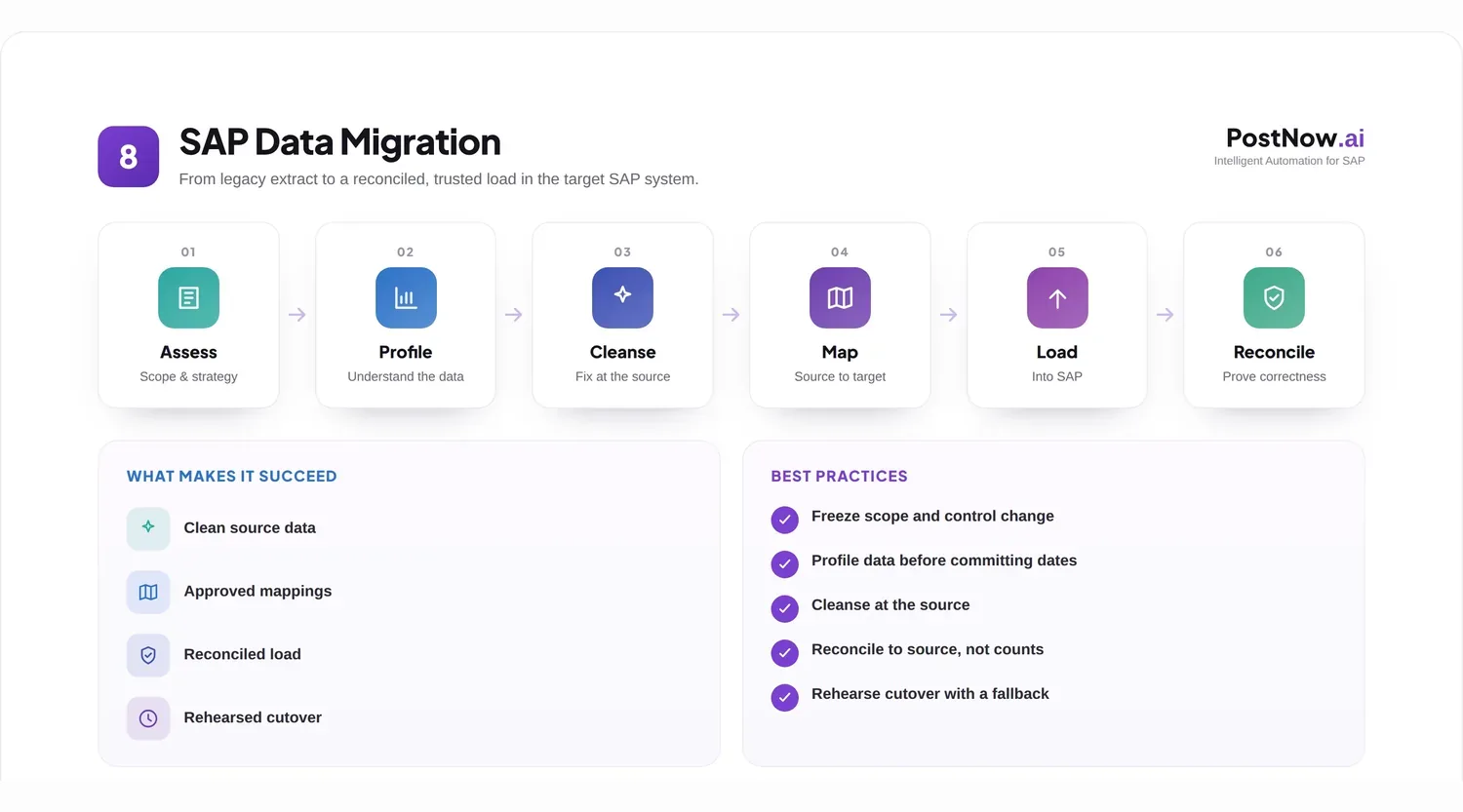
That data falls into two broad camps. Master data is the reference information that endures, such as suppliers, customers, and materials. Transactional data is the activity that flows against it, such as open invoices, orders, and stock balances. A migration usually has to handle both.
Organizations rarely migrate for its own sake. They move data because they are replacing an ageing platform, merging systems after an acquisition, retiring a tool that is no longer supported, or stepping up to S/4HANA. In each case the data has to come along, and it has to arrive in good shape.
Common scenarios include a fresh SAP implementation that pulls history from older software, a consolidation that merges several regional systems into one, and a conversion that lifts an existing ECC landscape onto S/4HANA. The mechanics differ, but the goal is the same: trustworthy data on day one.
For the program managers, architects, and data teams who run these projects, the day to day reality is less about moving bytes and more about decisions: what to bring, what to leave, and what good enough looks like for each object. A clear approach turns those decisions into a plan the whole team can follow.
Migrations are run by a mix of people: program managers who own the timeline, architects who shape the target model, consultants who know the objects, and the business owners who decide whether a record is right. Treating data migration as a shared effort, rather than a purely technical handover, is what keeps the result usable for everyone who depends on it.
Why SAP data migration projects matter
A migration is often the largest single data event an organization goes through, and its outcome shapes how well the new system performs for years.
ERP modernization
Moving to a current platform unlocks new capabilities, but only if the data underneath arrives clean enough to use them.
Business continuity
A smooth cutover keeps invoicing, shipping, and reporting running, so the business barely feels the switch.
Data quality
Migration is a rare chance to leave bad records behind rather than copying old problems into a brand new system.
System consolidation
Bringing several systems into one removes duplication, but it demands careful matching so nothing is lost or doubled.
Regulatory requirements
Auditors expect to trace what moved and to see that balances reconcile, so a defensible migration is part of compliance.
A platform to build on
Clean migrated data becomes the foundation for automation, analytics, and better decisions long after go-live.
Because so much rides on the result, migration deserves to be treated as a discipline in its own right, not a task squeezed into the final weeks of a wider program.
Types of SAP data migration
Most projects split their scope into master data and transactional data, because the two behave very differently and need different handling.
Master data migration
Master records are loaded first, since transactions reference them. They change slowly but carry many fields and rules.
| Object | What moves |
|---|---|
| Vendor | Supplier records across general, accounting, and purchasing data. |
| Customer | Account records across sales, accounting, and general data. |
| Material | Item records across the views each plant and function needs. |
| Business Partner | The unified S/4HANA entity that carries customer and vendor roles. |
| Cost Center | Controlling objects with hierarchy and validity dates. |
| Profit Center | Responsibility objects within the controlling area. |
Transactional data migration
Transactions are loaded after the master data they depend on, and usually only open or recent items come across rather than full history.
| Object | What moves |
|---|---|
| Journal entries | Opening balances and in-flight finance postings. |
| Purchase orders | Open commitments still expecting goods or invoices. |
| Sales orders | Open demand not yet delivered or billed. |
| Inventory | Stock balances brought in as opening quantities. |
| Open items | Outstanding receivables and payables carried forward. |
Deciding how much history to bring is a project choice in itself. Many teams keep the new system lean and archive the rest, rather than reloading years of closed documents.
Sequencing the two types correctly is essential. Master data has to exist before the transactions that point to it can load, so a missed dependency in the master layer surfaces as a wave of failures further down. Mapping those dependencies up front saves a great deal of rework during testing.
Common SAP data migration challenges
The same obstacles appear on most projects, and almost all of them start in the source systems rather than in SAP.
- Poor data quality, where legacy records are incomplete, outdated, or simply wrong.
- Duplicate records, where the same entity exists several times and has to be matched and merged.
- Legacy data issues, such as free-text fields, retired codes, and structures that have no clean equivalent in SAP.
- Mapping complexity, where source fields do not line up neatly with the target model.
- Data cleansing, which is almost always larger than first estimated.
- Testing challenges, where there is never quite enough time to trial every object and edge case.
- Cutover risk, where the final load has to land inside a tight window with little room for error.
None of these is insurmountable, but each rewards being found early. A problem spotted during discovery is an inconvenience; the same problem found during cutover is a crisis.
SAP data migration lifecycle
A migration runs through a recognizable set of phases. Naming them keeps the work visible and stops steps from being skipped under time pressure.
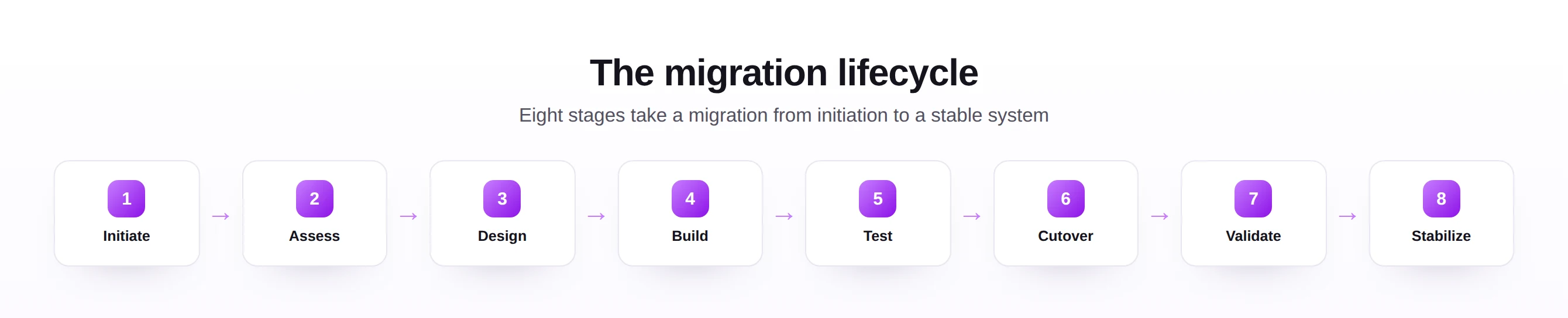
In practice the phases overlap and repeat rather than running in a strict line. Discovery often reopens as testing reveals new quirks in the source, and cleansing continues well into the trial loads. The value of naming the phases is not rigidity; it is making sure none of them is quietly dropped when the schedule tightens.
SAP ECC to S/4HANA data migration
For many organizations, the migration that matters most is the move from SAP ECC to S/4HANA, which is as much a data exercise as a technical one.
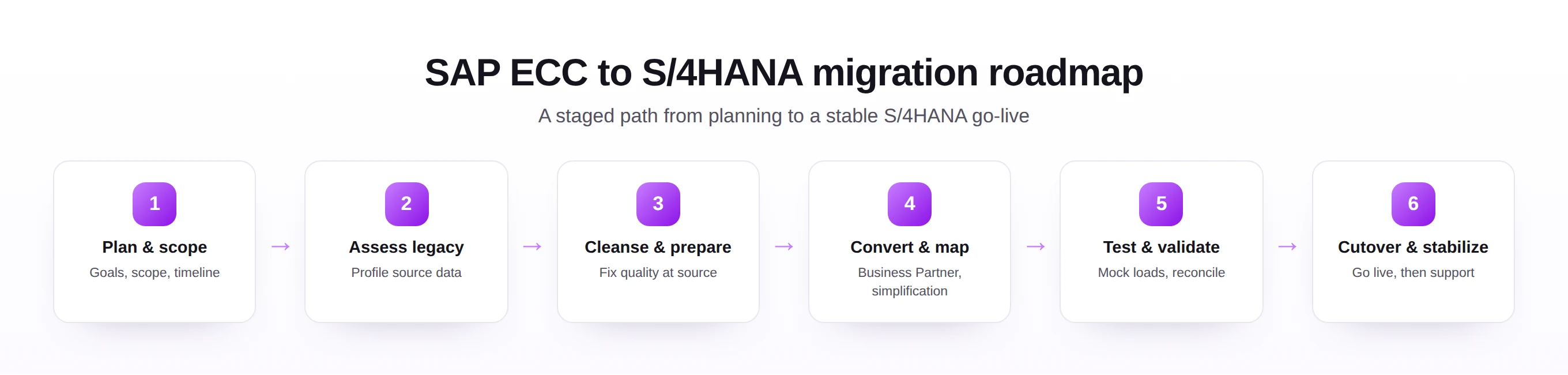
Why organizations migrate. Mainstream support timelines and the pull of a modern data model push most SAP customers toward S/4HANA sooner or later, and the transition is a natural moment to modernize the data itself.
Business Partner conversion. S/4HANA unifies customers and vendors under the Business Partner model. Reconciling the two source objects into one entity, with the right roles, is one of the defining data tasks of the move.
Simplification impacts. Several tables and structures are simplified or replaced in S/4HANA, so mappings written for ECC cannot simply be reused. Each affected object needs to be revisited against the new model.
Migration considerations. Teams have to decide between a fresh start and a conversion, how much history to carry, and how to keep the legacy system available for reference. These choices shape the whole plan and are best made early.
Underpinning all of it is data quality. The cleaner the ECC data before the move, the more predictable the S/4HANA go-live, which is why strong master data governance pays off long before the project begins.
SAP data migration tools
There is no single right tool. Most projects combine a few, choosing by data volume, complexity, and how repeatable the loads need to be.
| Approach | Where it fits |
|---|---|
| SAP S/4HANA Migration Cockpit | SAP's standard tool for S/4HANA loads, with predefined objects and templates. |
| LSMW | A long-standing ECC tool still used for legacy loads, though newer options are preferred for S/4HANA. |
| BAPIs | Standard SAP interfaces that post data through the same logic as the application, with full validation. |
| APIs | Programmatic interfaces for integrating and loading data from external systems. |
| Excel-based tools | Spreadsheet-driven loaders that suit business users preparing and validating data in a familiar format. |
| Automation platforms | Tools that combine mapping, validation, approval, and logging to make loads repeatable and auditable. |
The point is to match the method to the object. A handful of complex configuration records may justify careful manual work, while thousands of similar master records are better handled by a validated, repeatable load. The right SAP automation tools let teams keep that balance without writing code for every object.
When choosing between approaches, a few questions usually settle it: how many records of this object exist, how complex are the rules, and how many times will the load run. High volume and high repetition point toward validated automation, while a small set of intricate records may warrant a more hands-on method.
SAP data quality and migration readiness
Readiness is mostly about data quality. A project is ready to migrate when the source data has been measured, cleaned, and proven against the target rules.
- Data assessment, profiling the source to quantify gaps, duplicates, and invalid values before committing to a plan.
- Cleansing, fixing those issues at the source where possible, so corrections are not lost at the next extract.
- Validation, testing records against SAP rules so failures surface in a spreadsheet, not during cutover.
- Governance, agreeing who owns each object and who signs off that it is ready.
- Readiness planning, setting clear entry and exit criteria for each phase so progress is measurable.
It helps to make readiness an explicit decision rather than an assumption. Agreeing a clear go or no-go checkpoint for each object, with measurable criteria, turns readiness from a feeling into a fact and gives everyone the same picture before cutover begins.
SAP data migration best practices
A few habits separate migrations that land on time from those that slip.
- Govern the data with clear standards for what a valid, complete record looks like.
- Assign ownership so every object has a named business owner accountable for its readiness.
- Test repeatedly with mock loads, not a single rehearsal close to go-live.
- Validate early and often, checking against SAP rules from the first extract onward.
- Plan the cutover in detail, with a timed sequence, owners, and a fallback position.
- Document mappings and decisions so the migration is repeatable and defensible.
- Manage the change, keeping business users informed so they trust the new data on day one.
Above all, rehearse. A cutover that has been run end to end several times, against realistic data and within the real time window, removes most of the suspense from go-live. The teams that sleep well the night before are the ones who have already done the load more than once.
SAP data migration framework
A simple framework keeps a migration balanced, bringing five dimensions together around one goal: a trusted go-live.
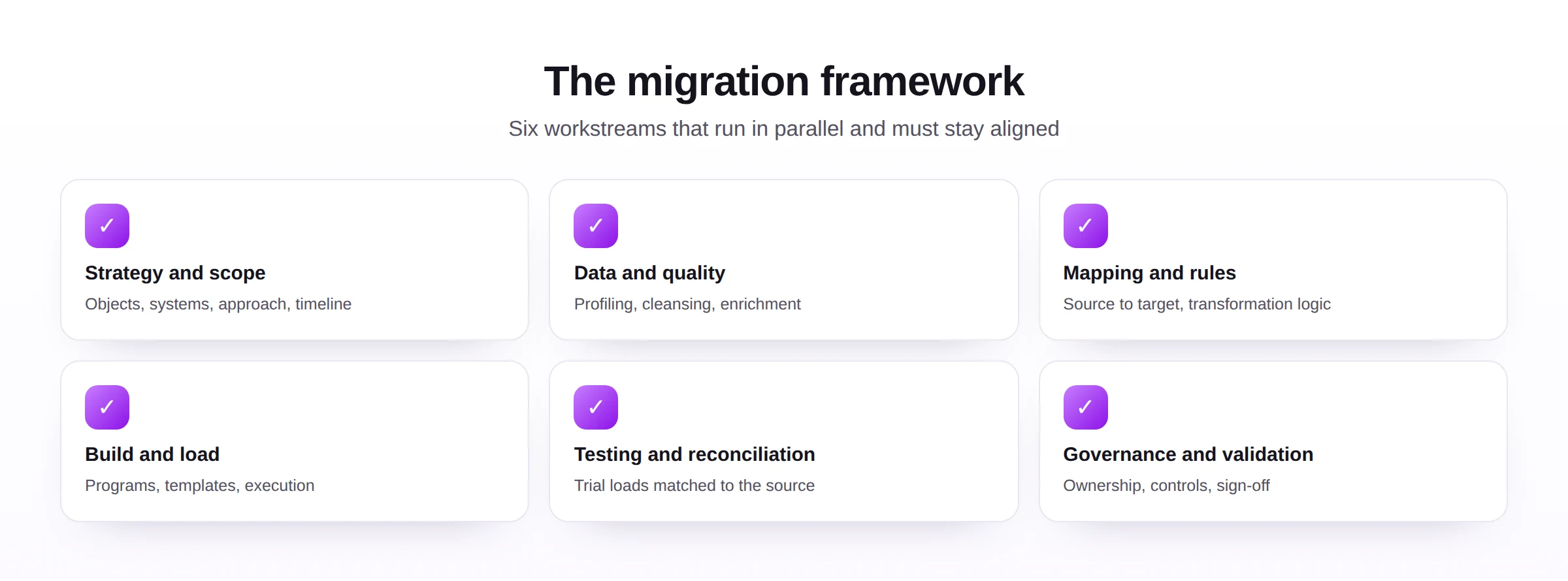
The strength of the framework is balance. People without process leads to inconsistent loads; technology without controls makes mistakes faster; metrics without ownership become reports nobody acts on. Keeping the five dimensions in step is what carries a migration from plan to a steady production system.
SAP data migration implementation roadmap
This roadmap turns the framework into an order of work, from defining scope to a stable production system.
- Define scope. Decide which objects, systems, and history are in and out.
- Assess source systems. Profile the data and surface quality issues early.
- Clean data. Correct and deduplicate records, ideally at the source.
- Define mappings. Agree how each source field becomes a target field.
- Build migration processes. Construct repeatable extract, transform, and load routines.
- Test migration. Run mock loads, reconcile, and fix what fails.
- Execute cutover. Run the live load in the planned sequence and window.
- Validate results. Reconcile counts and balances against the source.
- Stabilize production. Support users, monitor, and close out open issues.
The order of these steps is deliberate. Building load processes before the mappings are agreed, or attempting cutover before testing has settled, tends to multiply the work rather than save time. Each step earns the right to begin only when the previous one is genuinely complete.
Common SAP data migration mistakes
Knowing the usual traps makes them easier to design out.
Almost all of these are planning failures rather than technical ones. They are avoided by starting the data work early, naming owners, and refusing to treat testing and reconciliation as optional.
The future of SAP data migration
Migration is steadily becoming faster and less manual, though the fundamentals of clean data and careful reconciliation remain.
- AI-assisted mapping, suggesting how source fields should line up with the target model.
- Automated validation, checking large volumes against SAP rules with little manual effort.
- Migration accelerators, prebuilt objects and templates that shorten the build phase.
- Cloud migrations, as more organizations move SAP workloads to cloud platforms.
- S/4HANA modernization, with conversions used as a chance to simplify and standardize data.
The tools will keep improving, but the lesson does not change: a migration succeeds on the quality of the data going in and the rigor of the reconciliation coming out.
What stays constant is the human judgment around the automation. Deciding what is in scope, accepting the risk at cutover, and signing off that the data is right are calls people make, supported by better tooling rather than replaced by it.
SAP data migration and Excel-to-SAP automation
For all the platforms involved, Excel remains at the center of most migrations, because it is where business users prepare, review, and correct their data.
Why Excel still matters. The people who know whether a vendor or material is right tend to work in spreadsheets. Keeping data in Excel for cleansing and review means the experts can do the work without learning a new tool.
Mass migration use cases. Bulk loads of master records, opening balances, and open items are a natural fit for a spreadsheet-driven approach, where a single template can carry thousands of rows.
- Upload templates give each object a clear, consistent structure to fill in.
- Validation against live SAP catches errors before the load, not after.
- Automation benefits turn a manual, error-prone load into a repeatable, logged routine.
The same loaders used at go-live keep earning their place afterward, for the steady stream of new records every system needs. That is the bridge from a one-off migration to ongoing Excel to SAP automation and wider SAP process automation, covering objects from the vendor, customer, and material masters to journal entries, purchase orders, sales orders, and goods movements.
Used this way, a migration stops being a single dramatic event and becomes the first run of a process the business keeps. The templates, validations, and logs built for go-live are exactly what is needed to keep SAP data clean for the long run.