What are SAP automation tools?
SAP automation tools are software that take over the repetitive data and process work in SAP, so it runs faster, more consistently, and with less manual keying.
They span a wide range, from a simple utility that uploads a spreadsheet to a platform that maps, validates, routes, and logs an entire process. What they share is a purpose: to do the predictable parts of SAP work reliably, every time.
Purpose. A tool exists to remove effort and risk from a task that people would otherwise do manually. Instead of typing each record or chasing each approval, the tool applies the same rules and produces the same result on every run.
Business value. The benefit is rarely just speed. Automation tools make work repeatable, reviewable, and easier to scale, because the logic lives in the tool rather than in one person's memory.
Why organizations use them. Teams adopt automation tools when manual work no longer keeps up with volume, when errors are costly, or when they need to prove that a process followed the rules. Most SAP estates reach that point in finance, procurement, and supply chain first.
It is worth drawing a line between an automation tool and a quick workaround. A recorded macro or a one-off script can move data once, but a tool is built to do it repeatedly, safely, and visibly. That distinction, repeatable and governed rather than ad hoc, is what separates real automation from a shortcut that works until it does not.
It also helps to think of automation tools as a spectrum rather than a single product. At one end sit small utilities that do one job; at the other, broad platforms that span many. Most organizations end up with a few points on that spectrum, chosen to match the work in front of them rather than one tool stretched to cover everything.
Why SAP automation tools matter
The right tools change what a team can take on, because they lift the ceiling that manual work quietly imposes.
Scalability
Volume can rise without the team having to rise with it, because the tool absorbs the extra load.
Data quality
Built-in validation keeps incorrect records out of SAP rather than catching them later.
Process consistency
The same steps run the same way regardless of who is at the keyboard or how busy the week is.
Governance
Approvals and logs are part of the tool, so control does not depend on goodwill.
Operational efficiency
Less time on routine work means more time on the tasks that actually need people.
Digital transformation
Reliable automation is a building block for modern, data-driven ways of working on SAP.
These are the reasons automation tools tend to spread once a team sees them work. The first success makes the next one easier to justify.
For the managers and architects weighing these benefits, the practical question is where to start. The clearest early wins tend to be wherever manual effort is highest and the rules are most stable, because that is where a tool can take over the most work with the least ambiguity.
Categories of SAP automation tools
Automation tools fall into a few broad families. Most real estates use more than one, often together.
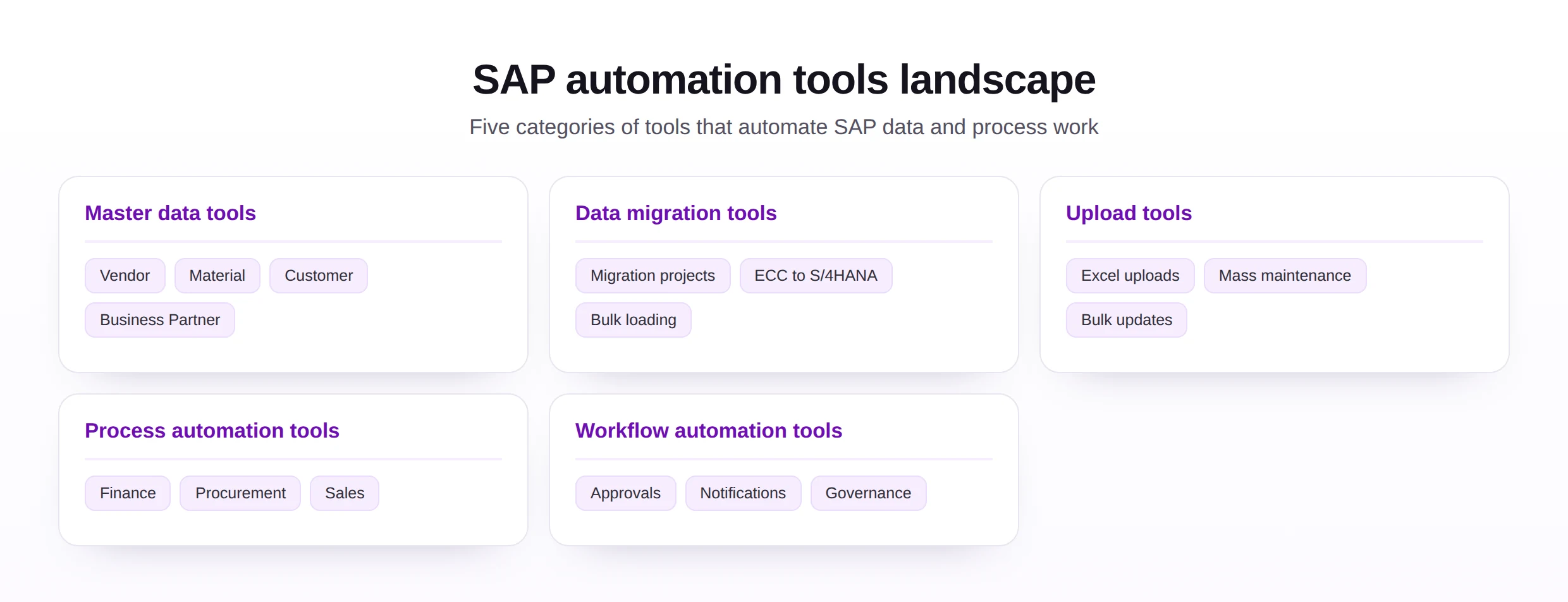
Master data automation tools
These create and maintain core records cleanly and in bulk, covering the vendor, material, and customer masters and the Business Partner. They sit close to master data management.
SAP data migration tools
These move data between systems, for new implementations, consolidations, and the step up to S/4HANA. They handle bulk loading and reconciliation, and pair with a clear data migration plan.
SAP upload tools
These take data from a spreadsheet into SAP, covering Excel uploads, mass maintenance, and bulk updates. They are the everyday face of Excel to SAP automation.
SAP process automation tools
These automate end-to-end work in finance, procurement, and sales, from journal entries and purchase orders to sales orders, as part of wider process automation.
SAP workflow automation tools
These route approvals, send notifications, and enforce governance steps, so work moves between people without manual chasing.
These categories are not walls. A single platform may span uploads, master data, and process work, while another organization deliberately uses focused tools for each. Neither is wrong; what matters is that the categories you adopt cover the work you actually do, without leaving awkward gaps between them.
Common challenges without automation tools
When everything is done manually, the same problems appear regardless of the team.
- Manual processing, which is slow and ties skilled people to repetitive tasks.
- Data entry errors, from typos to fields completed the wrong way.
- Spreadsheet complexity, where ad hoc files multiply and no one is sure which is current.
- Governance risks, when there is no consistent record of who changed what.
- Scaling challenges, as growing volume runs straight into the limits of manual effort.
What ties these problems together is that they grow quietly. None is dramatic on a single record, but each compounds across thousands, until a team that once kept up finds itself permanently behind. Tools matter precisely because they break that slow accumulation.
How SAP automation tools work
Most tools follow a similar internal sequence. Understanding it helps when comparing options or troubleshooting a load.
The order can vary, and a good tool hides much of this from the user. What matters is that every step is present, because skipping validation or auditability is where manual shortcuts usually creep back in.
Seen from this angle, a tool is really a packaging of these steps into something dependable. The difference between a risky macro and a trustworthy tool is not magic; it is that the trustworthy one performs every step, including the unglamorous ones, the same way on every run.
SAP automation tool technologies
Under the surface, automation tools rely on a handful of established technologies. Most combine several.
BAPI-based automation
Posts through SAP's standard interfaces with the application's own validation, a clean fit for objects that have a BAPI.
BDC-based automation
Replays a recorded transaction as a user would, covering screens that have no standard interface.
API-based automation
Uses modern interfaces for real-time integration, a strong fit for S/4HANA and connected systems.
Workflow-based automation
Routes tasks and approvals by business rules, moving work between people without manual chasing.
Excel-to-SAP automation
Brings business users into the picture, turning a prepared spreadsheet into validated SAP data.
No single technology is best in every case. The most capable tools choose the right one per object behind the scenes, so the person running the load does not have to.
Knowing the underlying technology is useful even when a tool hides it. It explains why one object loads cleanly while another needs a recorded transaction, and it helps a team ask the right questions when comparing tools that all promise the same outcome.
SAP standard tools vs automation platforms
A common question is whether to rely on what ships with SAP or to add a dedicated platform. Both have a place, and the answer usually depends on who runs the work and how often.
| Consideration | SAP standard tools | Automation platforms |
|---|---|---|
| Typical user | Technical or specialist users | Business users with guardrails |
| Best for | One-off or technical loads | Repeated, everyday processes |
| Setup effort | Can be higher per load | Configured once, reused often |
| Validation and logging | Varies by tool | Usually built in across the board |
| Cost | Included with SAP | A separate investment |
Governance considerations. As more people run loads, the questions shift to who may do what, how changes are reviewed, and whether every action is traceable. Platforms tend to make those controls explicit, while standard tools may rely more on surrounding process.
Maintenance considerations. Standard tools move with SAP itself, while a platform adds a component to keep current. The trade-off is the convenience and consistency a platform can bring to repeated work.
Many organizations land on a blend, using standard tools where they fit and a platform where business users need to run repeatable work safely.
The honest answer for most organizations is that the choice is not either-or. Standard tools and platforms solve overlapping but different problems, and the strongest estates use each where it is strongest rather than forcing one to do everything.
SAP automation tool selection criteria
Choosing a tool is easier with a clear set of criteria. These seven cover what matters most for everyday use.
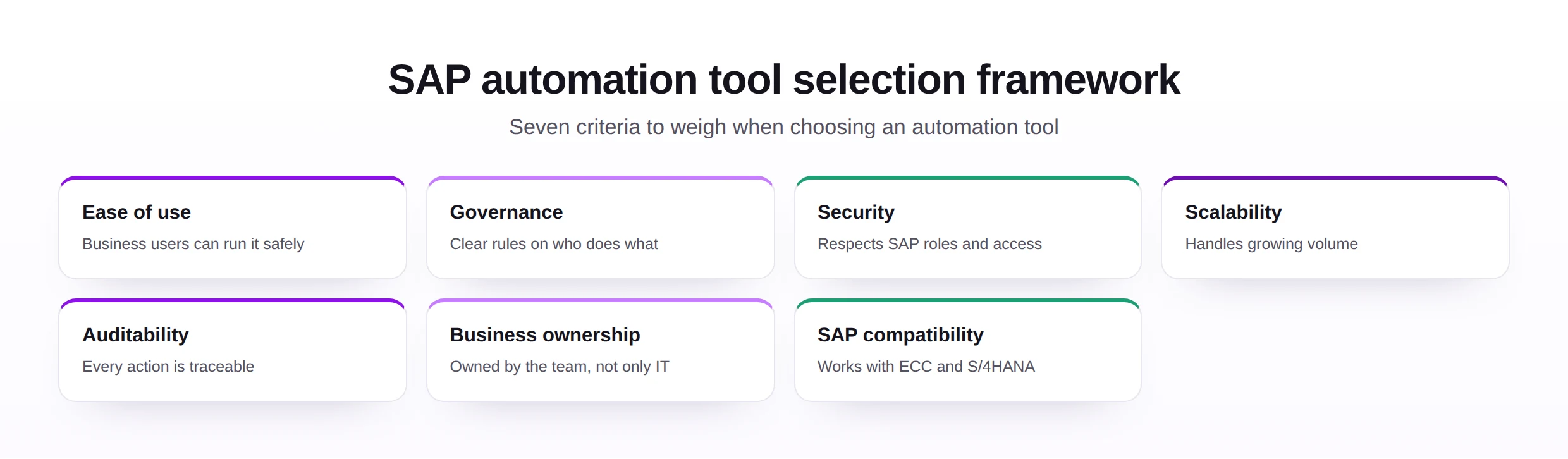
- Ease of use, so business users can run it safely without deep technical help.
- Governance, with clear rules on who can load or change what.
- Security, respecting SAP roles and segregation of duties.
- Scalability, handling growing volume without strain.
- Auditability, so every action can be traced after the fact.
- Business ownership, letting the team that owns the data own the tool.
- SAP compatibility, working cleanly with ECC and S/4HANA.
Weighing these against your own processes matters more than any feature list. The best tool is the one your team will actually use correctly, run after run.
A useful exercise is to score candidate tools against these criteria with the people who will actually run them, not only the people who buy them. A tool that dazzles in a demo but frustrates daily users will quietly fail, while a simpler tool that fits the team can succeed for years.
SAP automation best practices
A tool delivers its value only when it is used well. These habits keep automation safe and effective.
- Govern it, with clear ownership and rules before rollout.
- Use templates, so every load starts from a consistent structure.
- Validate every run, against SAP rather than only against the file.
- Test before going live, on a safe set of records.
- Earn adoption, by making the tool the easiest correct option.
- Monitor in production, so issues surface early.
The common theme is that the tool is only half the answer. The other half is the discipline around it, which is what turns a capable tool into a dependable one.
None of these practices is unique to a particular tool, which is the point. They are what make any tool pay off, and a team that builds these habits can adopt new tools far more easily, because the discipline travels with them rather than living inside one product.
Treat the rollout of a tool as a small change program in its own right. The teams that succeed pair the technical setup with a little communication and training, so the people affected understand what is changing and why, and arrive ready to use the tool rather than resist it.
SAP automation framework
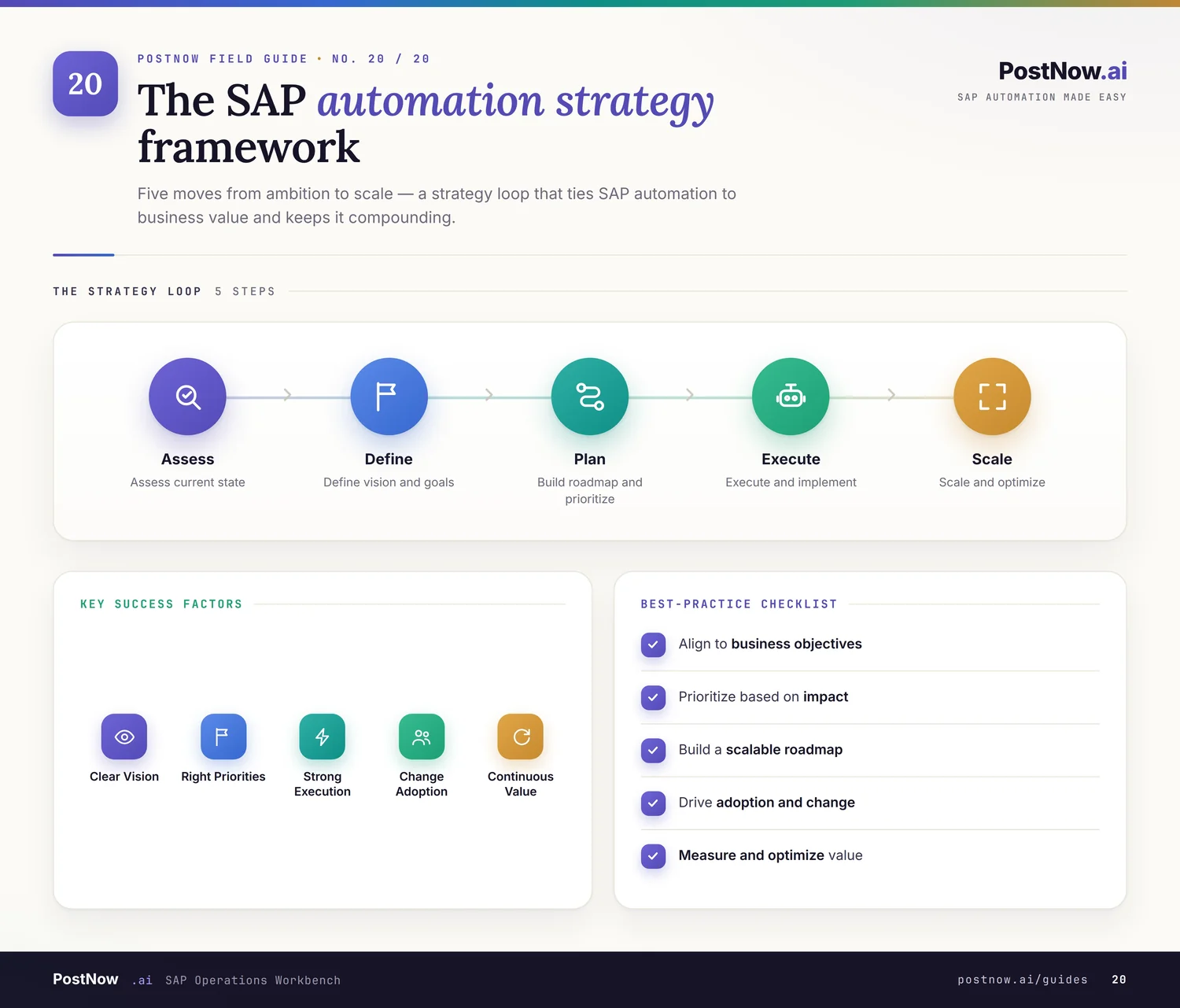
A simple framework keeps a tool program balanced, bringing five dimensions together around dependable automation.
The framework is deliberately even-handed across its five parts, because a tool program tends to break at whichever it neglects. Strong technology cannot compensate for missing ownership, and tight controls cannot rescue a process no one designed. Keeping the parts in step is what makes the whole dependable.
SAP automation implementation roadmap
This roadmap turns the framework into an order of work, from spotting opportunities to a program that keeps improving.

- Identify opportunities. Find the work that costs the most manual effort.
- Prioritize use cases. Start where value is clear and risk is manageable.
- Select tools. Match the tool to the work and the people who will run it.
- Configure processes. Set up templates, mappings, validation, and routing.
- Test. Trial each process on safe data and confirm the results.
- Deploy. Roll out to the team that owns the work.
- Train users. Make sure people can run and review each process.
- Monitor and improve. Track results and refine where things strain.
Following the roadmap in order is itself a safeguard. Selecting a tool before the use cases are clear, or deploying before testing has settled, are the missteps that turn an automation effort into a cycle of rework rather than a steady set of wins.
Common SAP automation mistakes
Most failures trace back to approach rather than to the tool itself.
Each is avoidable by reversing it: understand the process first, agree ownership and controls, design before you build, test properly, and keep an owner accountable once it is live.
The reassuring part is that none of these mistakes requires advanced technology to avoid. They are corrected by understanding the work first, agreeing ownership and controls, and treating the tool as the last decision rather than the first.
The future of SAP automation tools
Tools are getting smarter and more accessible, while the need for validation and control stays constant.
- AI-assisted automation, suggesting steps and catching anomalies as work runs.
- Intelligent validation, flagging likely errors before a load is processed.
- Low-code platforms, letting business teams build and adjust automation with less technical help.
- Process mining, revealing how work really flows so the right tasks get automated.
- Enterprise automation ecosystems, connecting many tools under shared standards.
The direction is toward less manual effort and more confidence. The constant is that automation only pays off when it rests on sound data, clear processes, and real controls.
Through every one of these advances, the goal stays the same. Better tools are valuable only insofar as they produce accurate SAP data and dependable processes, which is why the fundamentals of validation, governance, and ownership remain the real measure of any tool.
The role of Excel to SAP automation tools
Among all the categories, Excel-based tools have an outsized role, because the spreadsheet is where so much SAP work already begins.
Why Excel remains important. The people who know the data tend to work in Excel. A tool that meets them there lets the experts prepare and review records without learning a new system.
Structured templates. A consistent template gives each object a clean, predictable input, which is what makes the rest of the automation reliable.
Upload automation. Loading prepared data in bulk, with validation every time, removes the slowest and most error-prone part of many tasks. This is the heart of Excel to SAP automation.
Data migration. The same spreadsheet-driven tools are invaluable during a data migration, where large volumes of records have to be prepared, checked, and loaded.
Business-user adoption. Because they build on a familiar tool, Excel-based automation tends to be adopted quickly, which is often what gets a wider process automation effort moving.
That is why Excel-based tools so often serve as the on-ramp to a broader toolkit. They prove the value quickly, win over the people who do the work, and establish the templates and checks that later tools build on, turning a single upload into the start of a wider capability.