SAP cost center automation covers creating and maintaining cost centers without working ticket by ticket through KS01. PostNow runs the job from Excel: each cost center takes a row, and the add-in posts the set to SAP with the standard BAPI_COSTCENTER_CREATEMULTIPLE, scoping the run to your controlling area, honouring the valid-from and valid-to dates every cost center carries, checking the values, and recording the whole batch in one pass, with any SAP error translated into plain language.
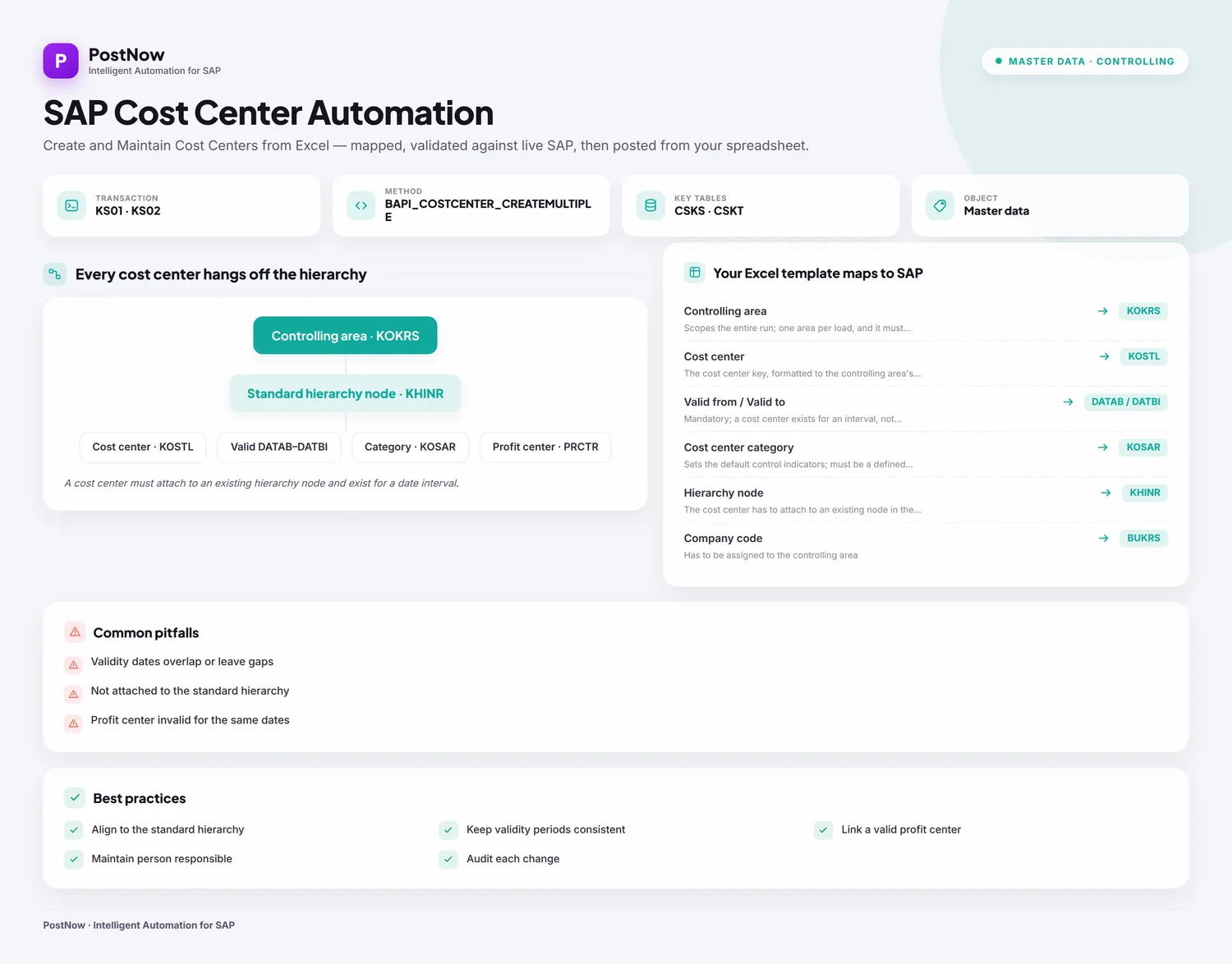
The walkthrough runs to twelve steps and shows a cost center upload from Excel to SAP end to end, covering fresh cost centers and edits to ones already on file. Keep the mapping and you have a cost center Excel template ready for the next reorganisation or fiscal-year change. The method holds on classic ECC and on S/4HANA, where Controlling still creates cost centers behind KS01 and the same BAPI. Once the initial setup is done, the people loading the data touch no ABAP and wait on no developer.
Why automate cost center creation rather than keying KS01
Building a cost center by hand runs through KS01: set the controlling area, key the validity dates, fill in the name, category, person responsible, hierarchy node, and company-code assignments, save, repeat. One or two are no trouble. A reorganisation, a new company code, a fiscal-year rollover, or a controlling-area harmonisation during an S/4HANA move turns it into hundreds of near-identical entries, and that is where hierarchy nodes, categories, and profit-center links start to slip.
A cost center upload takes the keying away. The list lives in Excel, and the whole batch posts to SAP under one controlling area in a single run. For a bulk cost center creation at go-live or a mass cost center upload after a restructure, the awkward parts, selecting the function, lining columns up to fields, formatting the validity dates, and making sense of CO error codes, are taken off your plate. The twelve steps below are the full method.
Before you start: what you need
- Your cost centers in Excel, one row each, with a column for every field you intend to set, and the controlling area named so the run knows where to post.
- SAP authorization matching
KS01andKS02in the controlling area you are loading, including the right to attach cost centers to the standard hierarchy. - PostNow in Excel, linked to your SAP system. The supporting function modules are installed in SAP once at setup, and the day-to-day cost center loads then live entirely in the task pane.
KS01 at the front and BAPI_COSTCENTER_CREATEMULTIPLE underneath, so the steps here apply without change. S/4HANA also exposes the Manage Cost Centers app, but the load mechanism is identical.Your cost center Excel template: the fields SAP expects
A cost center is time-dependent and lives inside a controlling area, so a few fields carry more weight than the rest. These columns are the core of a cost center upload template; include them, and confirm the values they point at already exist in the target controlling area.
| Excel column | SAP field | Why it matters |
|---|---|---|
| Controlling area | KOKRS | Scopes the entire run; one area per load, and it must exist (TKA01) |
| Cost center | KOSTL | The cost center key, formatted to the controlling area's convention |
| Valid from / Valid to | DATAB / DATBI | Mandatory; a cost center exists for an interval, not indefinitely |
| Cost center category | KOSAR | Sets the default control indicators; must be a defined category (TKA05) |
| Hierarchy node | KHINR | The cost center has to attach to an existing node in the standard hierarchy |
| Company code | BUKRS | Has to be assigned to the controlling area |
| Profit center | PRCTR | Usually required, and must be valid for the same dates (CEPC) |
BAPI_COSTCENTER_CREATEMULTIPLE builds one or many cost centers in a single call, and its sibling BAPI_COSTCENTER_CHANGEMULTIPLE edits existing ones. Both take the controlling area as one import and a COSTCENTERLIST table that holds a row per cost center, validity dates included, with a RETURN table reporting the outcome line by line. There are no per-field update flags here, creating and changing are simply two different functions, and a built-in TESTRUN switch lets you rehearse a load without committing it. That is why Step 2 has PostNow's function finder pick BAPI_COSTCENTER_CREATEMULTIPLE (or the change variant) and pull its list structure straight in.The cost center upload, step by step
Lay out and open your sheet
Put one cost center on each row under headers such as Controlling Area, Cost Center, Valid From, Valid To, Name, Category, Hierarchy Node, and Company Code. Open the workbook and bring up the PostNow task pane next to it.
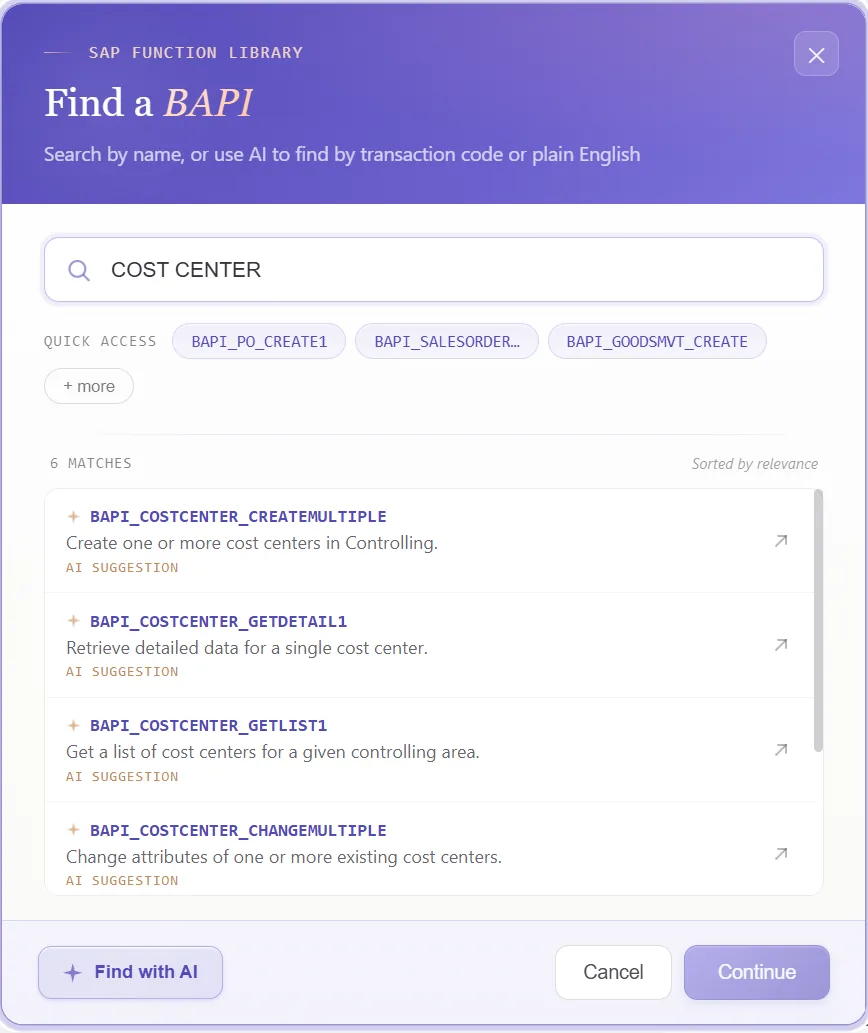
Choose the cost center BAPI
With a standard function on hand, nothing needs recording. Open the function finder and select what the job calls for:
- For new cost centers, pick
BAPI_COSTCENTER_CREATEMULTIPLE, which posts one or many in a single call - To edit existing ones, choose
BAPI_COSTCENTER_CHANGEMULTIPLE; here create and change are separate functions rather than one with flags - Either way the controlling area travels as a single import, and a built-in test-run switch lets you rehearse before anything commits
Confirm the function and PostNow returns its list structure, the controlling-area import plus the per-cost-center fields, ready to line up with your columns. The choice sticks for every row, so you skip KS01 entirely.
Look over the structures it returns
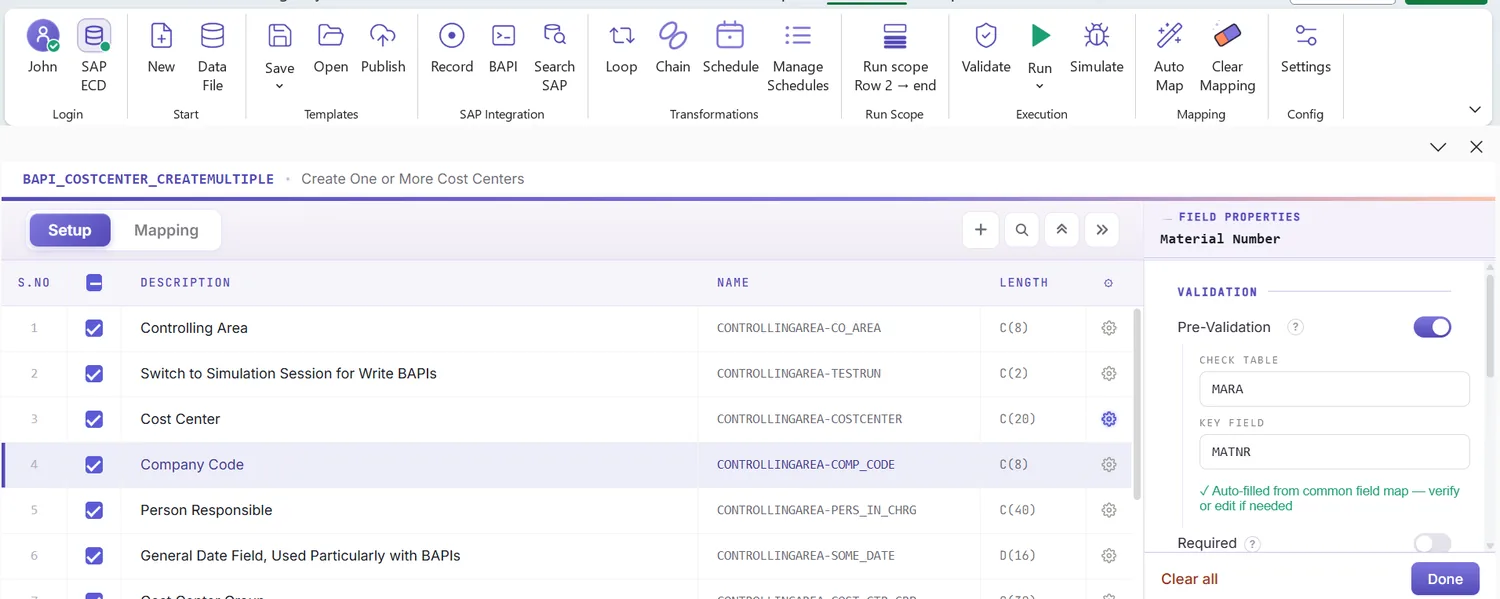
The function hands back a compact set of structures: one controlling-area import and a single list where each row is a cost center. Because it maps onto how Controlling stores the data, a glance shows what is fixed for the run and what varies line by line:
That overview tells you, before any mapping, which column belongs to the run as a whole and which belong to each cost center.
Open the Mapping Designer
The selected BAPI loads the Mapping Designer with a line per field. Two points are worth noting for cost centers:
- Extensions are handled. Any append fields your controlling area adds to the cost center structure are detected automatically, so customer-specific columns are there to map.
- Hand-additions work too. Whatever is not picked up, you add yourself, which keeps standard and custom fields in a single load.
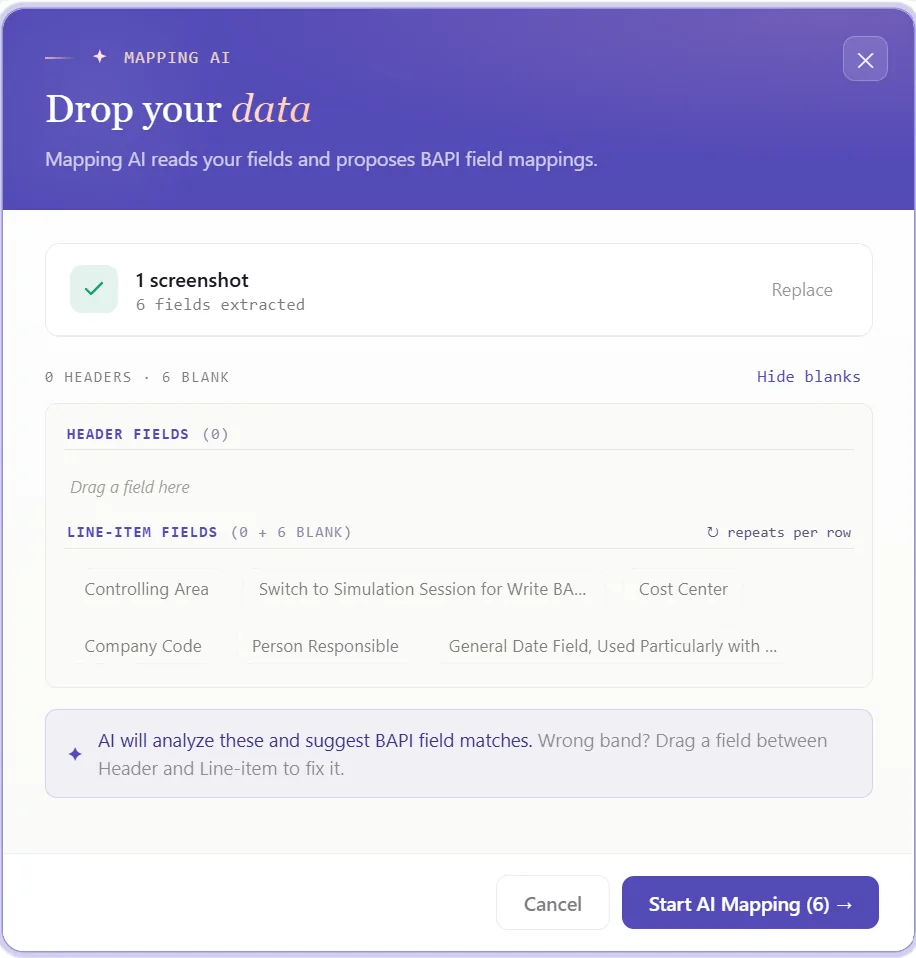
Match columns with Mapping AI AI
Now join the structure to your data. Mapping AI proposes an Excel column for each SAP field, reading your headers or a screenshot you drop in, and you confirm or adjust, which saves real time when a cost center carries validity dates, a category, a hierarchy node, and a string of organizational assignments.
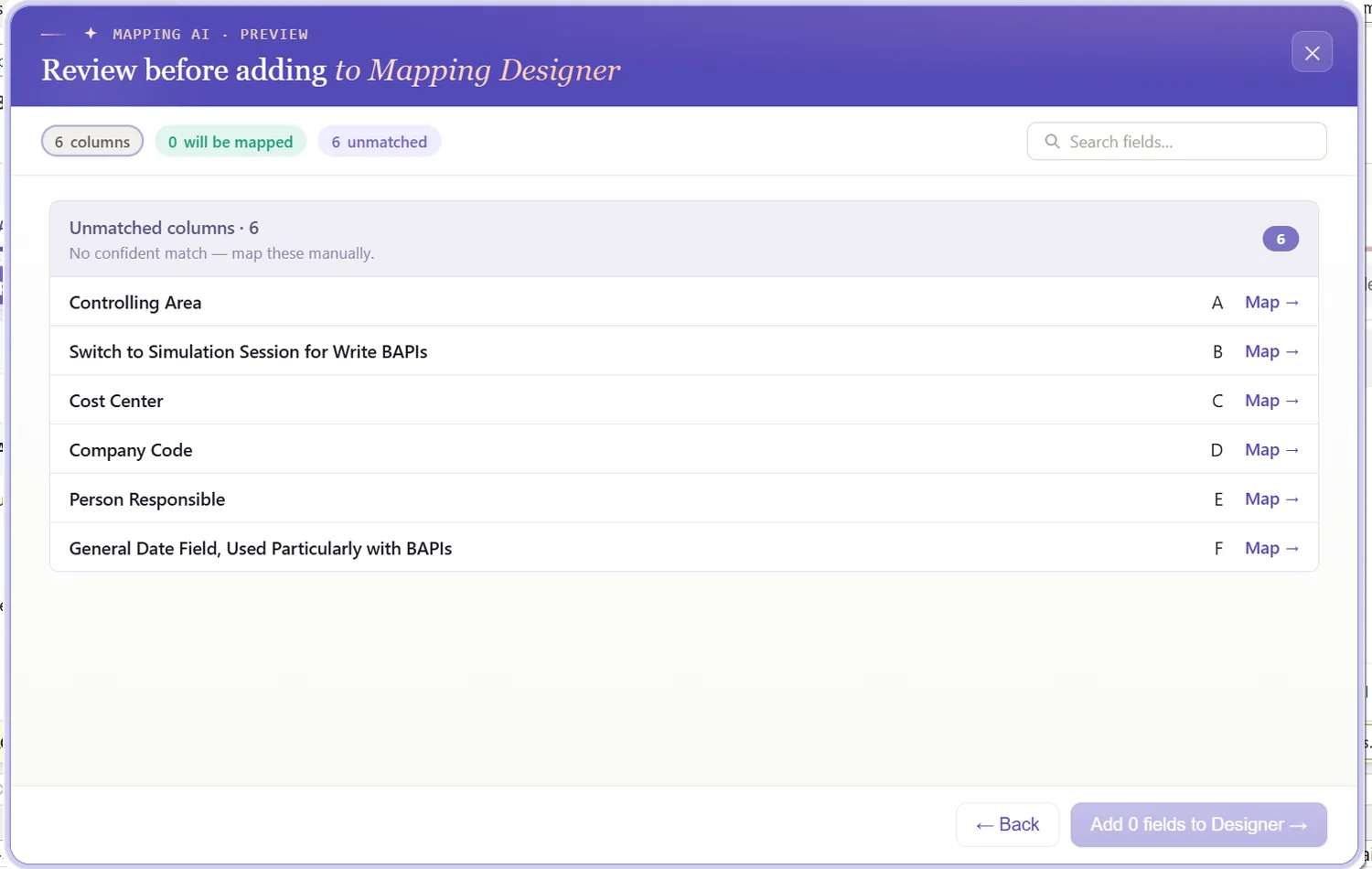
Auto Map and stamp the headers
Hit Auto Map to fix the mapping in place. Each field is tied to its column and SAP-tagged headers are written across the sheet, so the workbook becomes the template and stays aligned with the BAPI's list structure.
Format the values and the validity dates
A field's properties govern how its value leaves Excel: leading zeros on the cost center key, upper case on category and area codes, trimmed spaces, defaults, and regex. Validity matters most here, set the date format on Valid From and Valid To so the interval lands correctly, since a mistyped date is the quietest way to misfile a cost center.
Because creating and changing are different functions, there are no per-field update flags to set. When a row is an edit rather than a new entry, PostNow routes it through BAPI_COSTCENTER_CHANGEMULTIPLE and sends only the fields you have touched, so a mass change stays as light as the data you actually altered.
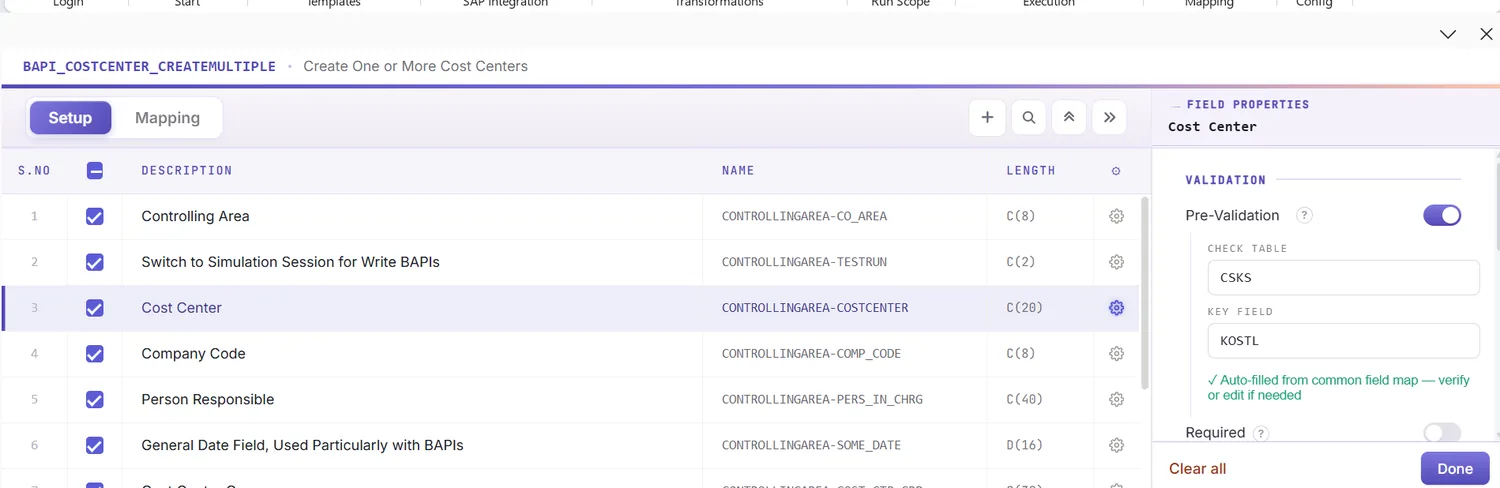
Check the data in Excel first
There is a reason to check before posting: a Controlling error usually arrives as a terse code once the row has already failed. Validate gets ahead of it, every row is measured against SAP's length, format, and required-field rules, and the cells at fault are flagged, so the sheet is clean before a single record is sent.
Confirm against live SAP
Tidy formatting still is not proof a value exists, a hierarchy node or category can read fine and be missing from the controlling area. To test it, open the field's properties, switch on field validation, and supply the check table and field, a category against TKA05, a profit center against CEPC, or a company code against T001. Select the cell, run Validate master data, and PostNow asks live SAP whether the value is present and active.
Shape the load with loops and conditions
When the file is more than a single flat list, arrange it first:
- Loops (by controlling area): group rows so each controlling area posts as its own batch under the correct import, useful when one file spans several areas after a merger.
- IF conditions: process only the rows that qualify, for instance loading a cost center only where an active flag is set, or skipping rows still missing a hierarchy node.
Set the scope, post, and review AI
Choose the range with Run Scope, a single test row before the rest, and press Run. The BAPI's own test-run mode pairs neatly with this. A few aids:
- Run log: outcomes appear live in the run window and copy into a log column beside each row in Excel.
- Payload view: open the precise data sent to SAP for any cost center, so a failure is never a guess.
- AI error review: AI Review reads the CO message and explains, in plain words, what blocked the row and where to fix it.
- RETURN per row: the BAPI reports one message per cost center, and PostNow ties each to its row so you see exactly which entry, and which field, needs attention.
Publish and roll it out to the team
When the run comes back clean, publish it. The configuration becomes a script your colleagues can run unchanged, they open it, paste their cost centers, and post, with no mapping to recreate and no need to know the BAPI behind it. The one-time build becomes the team's standard way to load cost centers.
Let's talk
Bring a real cost center list and a live SAP connection to a working session. We will scope the controlling area, map the fields, validate, and post it for real, with AI taking the strain. No slide decks.
Frequently asked questions
What is SAP cost center automation?
KS01. With PostNow the cost centers stay in Excel and post in one governed run via BAPI_COSTCENTER_CREATEMULTIPLE, while AI maps the fields, checks the values, and explains any Controlling error.How do you upload cost centers from Excel to SAP?
BAPI_COSTCENTER_CREATEMULTIPLE and checks the data against live SAP, so there is no KS01 keying and no ABAP.Which BAPI creates SAP cost centers?
BAPI_COSTCENTER_CREATEMULTIPLE creates one or many cost centers in a single call, and BAPI_COSTCENTER_CHANGEMULTIPLE edits existing ones. Both take the controlling area as an import and a list of cost centers, and both report results in a RETURN table. PostNow's function finder selects the right one, including a test run before you commit.Is there a template for uploading cost centers to SAP?
Can you mass-change existing cost centers from Excel?
BAPI_COSTCENTER_CHANGEMULTIPLE, sending only the fields you changed, the Excel equivalent of a KS12 mass change. Creating new cost centers and editing existing ones can even run from the same sheet.