Introduction
If your data already lives in a spreadsheet, getting it into SAP should not mean typing it all again. Uploading from Excel turns hours of manual keying into a quick, checked, repeatable load.
The need shows up everywhere: a finance analyst with a workbook of journal lines, a buyer onboarding a batch of new vendors, a planner updating prices, or a project team loading records during a go-live. In each case the data is ready in Excel, and the only question is how to get it into SAP cleanly.
This is a practical walkthrough rather than a theory lesson. It follows the actual steps of an upload from start to finish, and it pairs with the Excel to SAP automation pillar for the wider picture.
By the end you should be able to picture the whole path, from a prepared spreadsheet to posted records, and know where the care is really needed.
One reassurance before the detail: you do not need to be a developer to do this well. The technical parts, the interfaces and the field names, are increasingly handled by tools, leaving you to focus on what only a person can judge, namely whether the data is right and whether it belongs in SAP at all.
Throughout this guide, the emphasis is on doing the upload safely rather than merely quickly, because a fast load that posts bad data is no bargain. The good news is that the safe way is barely slower once it becomes routine.
Core concepts: what an upload involves
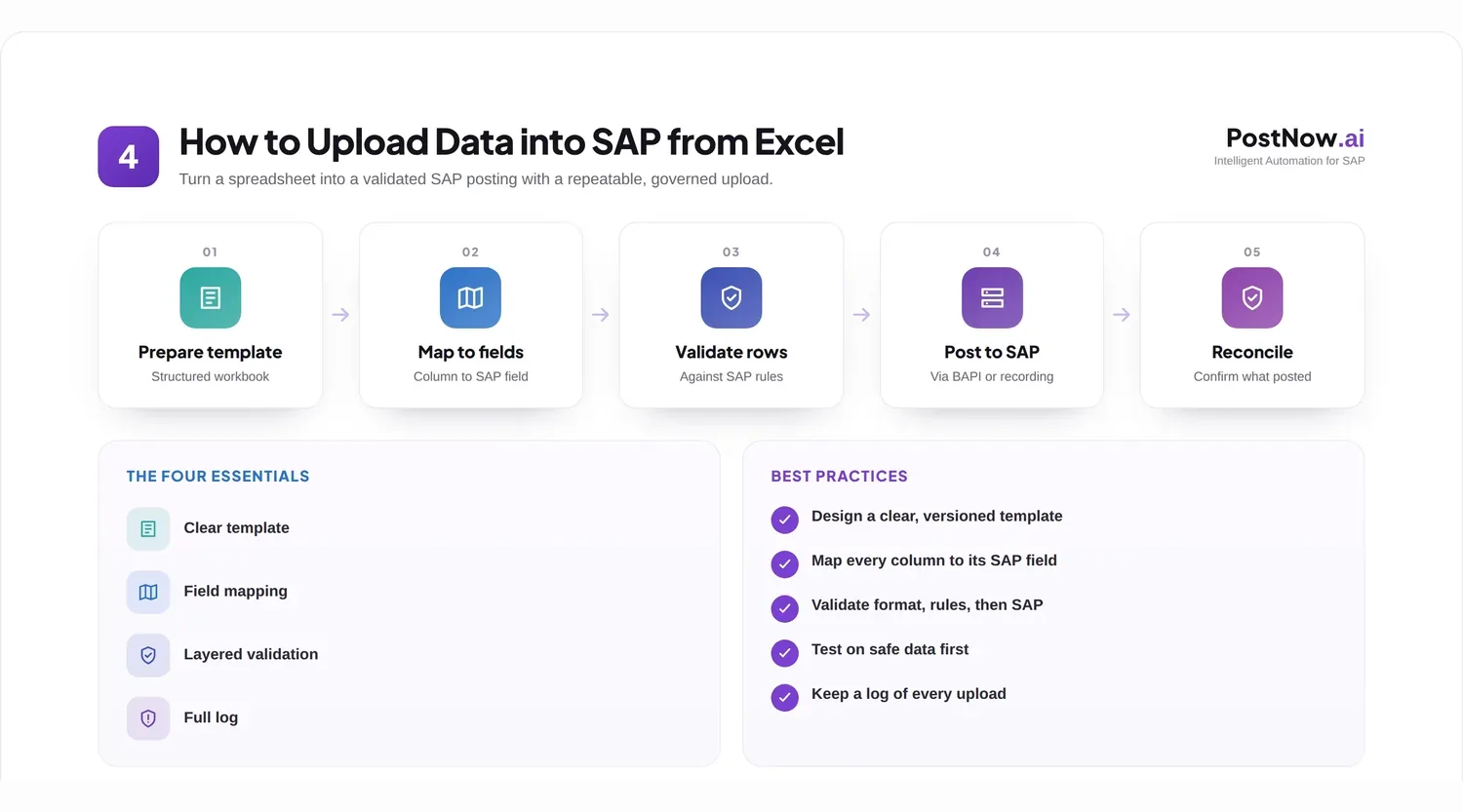
Before the steps, it helps to see the whole journey at a glance. An upload is a short pipeline, and each stage has a job.

It is worth slowing down on that overview, because the order of the steps is not arbitrary. Each one assumes the previous is done: you cannot map columns sensibly until you have a template, and you cannot validate meaningfully until the mapping is in place. Skipping ahead tends to create rework rather than save time.
Three things have to be true before you begin. You need the right access in SAP for the object you are loading, a way to post the data such as a standard interface or a recorded transaction, and a clean spreadsheet shaped to match the target.
It also helps to keep one idea front of mind: the spreadsheet is where people prepare and correct data, while the upload is the careful bridge that carries it into SAP. Keeping that bridge honest, with checks and a log, is what makes the difference between a quick win and a quiet mess.
None of this is exotic. A first upload may feel fiddly, but the same handful of steps repeats for almost any object, so the effort to learn it is paid back many times over.
A final framing for the concepts: think of an upload as moving trust, not just data. When the load is checked and logged, the records that arrive in SAP carry the same confidence as if a careful person had entered each one, which is exactly the outcome you want.
With these pieces in place, the rest is mostly following the steps in order and paying attention at the moments that matter. The walkthrough later in this guide makes those moments explicit.
Business scenarios
Uploads earn their place in a few recurring situations. Recognizing yours helps you judge how much rigor it needs.
- Onboarding batches, such as a list of new vendors or customers to create at once.
- Periodic postings, like a month-end set of journal entries from a finance workbook.
- Operational volume, for example a day of goods movements or a batch of purchase orders.
- Maintenance updates, such as a price or terms change across many material records.
- Migration loads, where large volumes are loaded during an implementation or an S/4HANA move.
The pattern that decides whether to automate is repetition and size. A single record typed once is fine; a list of hundreds, or a task you repeat every month, is exactly where an upload pays off. On both ECC and S/4HANA the approach is the same, though the available interfaces differ in their detail.
Knowing your scenario also tells you how much ceremony to add. A one-off load of a dozen rows needs little more than a quick check, while a recurring month-end load or a migration deserves a tested template, a clear owner, and a saved log. Matching the effort to the stakes keeps small jobs light and big ones safe.
Recommended approaches: the steps in practice
Here is the walkthrough itself. Take the steps in order; each one sets up the next.
Step 1: Prepare the data
Get the spreadsheet right first. Clean obvious errors, remove blank rows, and make sure each row represents exactly one record. Time spent here saves far more time later.
A useful tip for preparation is to fix problems in the source data wherever you can, not just in the copy you are about to load. A correction made only in the upload file has to be made again next time, while a fix at the source stays fixed and improves every future load.
Step 2: Start from a template
Use a template whose columns match the SAP fields you are loading. A good template names each column clearly, marks what is mandatory, and lists valid codes, so the data is shaped correctly from the outset.
Step 3: Map columns to fields
Match every spreadsheet column to its SAP field. The example below shows the idea: a handful of friendly column names lining up with the technical fields SAP expects.
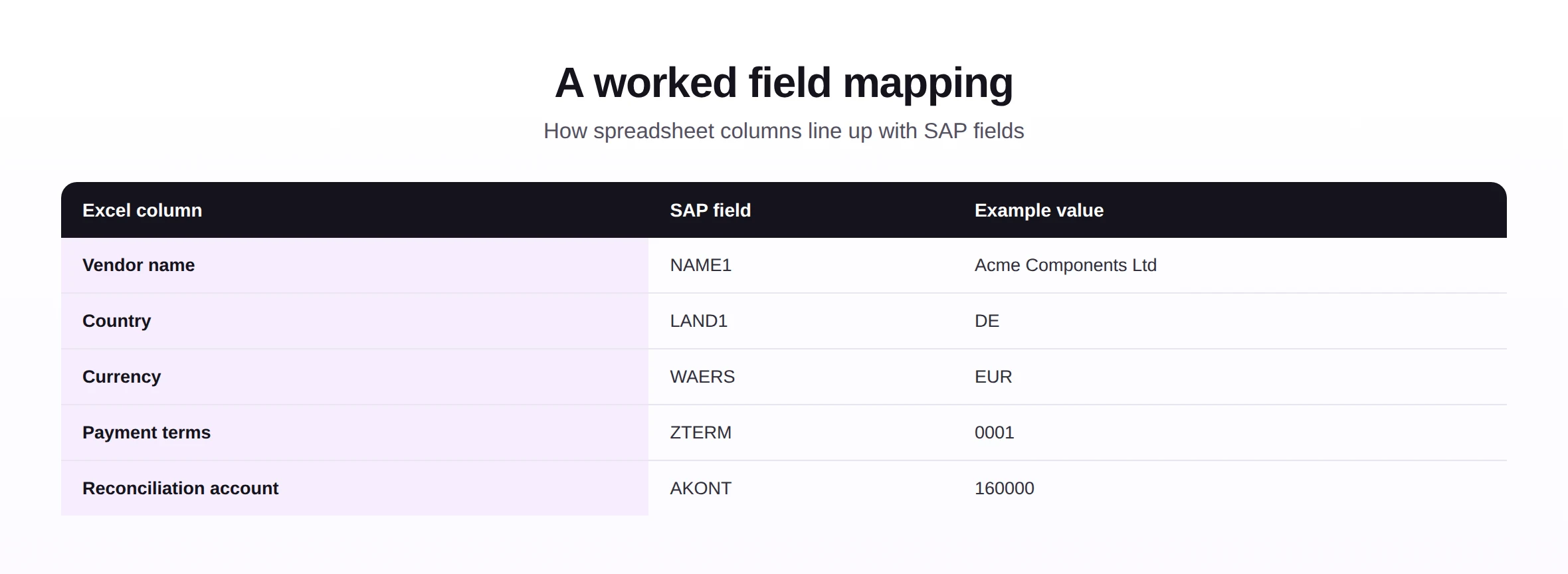
Mapping is where most silent errors hide, so it rewards a careful eye. Watch especially for fields that look similar but mean different things, and for codes that must be entered exactly as SAP expects. Getting the mapping right once, and saving it, means you rarely have to think about it again.
Step 4: Validate before posting
Check the rows against SAP rules before anything is written. This is the step that prevents bad data entering the system, and it is the one most worth never skipping.
Step 5: Load the valid rows
Post the rows that pass, through a standard interface where one exists or a recorded transaction where it does not. For the difference between those two routes, see the comparison of BAPI and BDC.
When you load, resist the urge to push everything at once on the first attempt. A small first batch confirms the mapping and validation are behaving before you commit the whole file, and it turns a possible large failure into a tiny, easily corrected one.
Step 6: Handle the errors
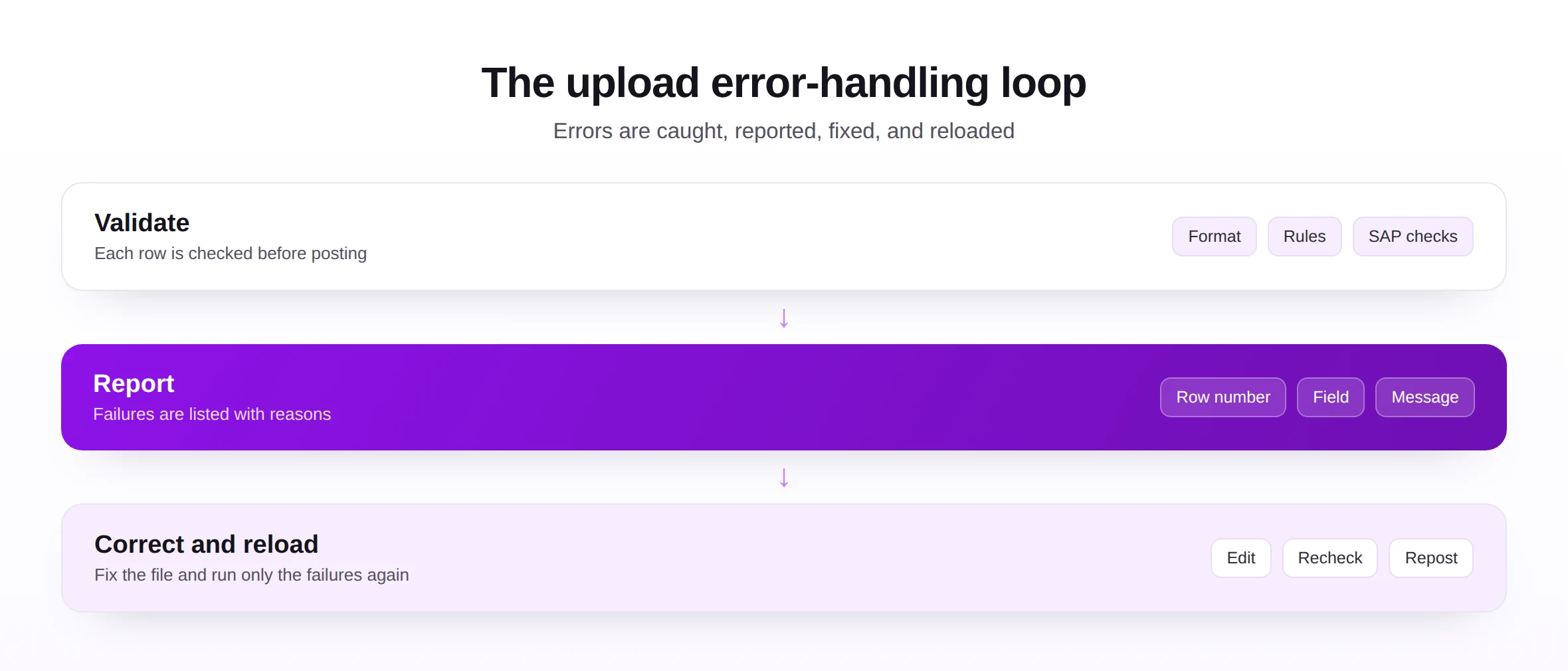
Any rows that fail come back with a reason. The loop below is the heart of a calm upload: read the message, fix the file, and reload only the rows that failed.
Step 7: Keep it governed
Respect SAP roles, keep a log of what was loaded, and test new uploads on safe data first. Governance is what lets the same upload be trusted when many people run it.
Errors are not a sign that something went wrong; they are the upload doing its job. A clear list of failures, each with a reason, is far better than a load that posts bad data quietly. Treat the error report as helpful feedback, work through it calmly, and the final result is data you can fully trust.
An upload checklist
Use this short checklist before every load. It captures the steps above as quick yes-or-no questions.
| Check | Before you load, confirm... |
|---|---|
| Access | You have the SAP authorization for this object. |
| Template | The file matches the current template and its rules. |
| Mapping | Every column points to the right SAP field. |
| Validation | Rows are checked against SAP, not just the file. |
| Test | A small batch has been tried on safe data. |
| Log | The run will record what posted and what failed. |
The checklist is deliberately short so it actually gets used. A load that passes all six is very unlikely to surprise you, while skipping any one of them is where most upload trouble begins.
It is worth pinning this checklist somewhere visible the first few times. After a handful of loads the steps become second nature, but early on a quick glance down the list prevents the small omissions that cause most first-time frustrations.
Common mistakes
The errors below are common precisely because each feels like a harmless shortcut.
Each has a direct fix from the walkthrough: start from a template, control formatting, validate against SAP, test on safe data first, and always keep a log. None of these adds much time, and together they remove almost every common failure.
Notice the common thread: every mistake is a check skipped to save a minute. The cure is never complicated, and the minute saved is always smaller than the time lost cleaning up afterward. Once you have seen that trade play out once, the habits tend to stick on their own.
Best practices
A few habits turn a working upload into a dependable one you can hand to anyone.
- Make templates shared and versioned, so everyone loads from the same current structure.
- Validate every run against SAP, so the file can never quietly drift from reality.
- Keep a complete log, so any load can be explained and reviewed afterward.
- Respect roles and segregation of duties, anchored in master data governance.
- Reuse the same path for similar objects, supported by broader automation tools.
These practices favor maintainability and auditability over cleverness. An upload that is easy to repeat, easy to check, and easy to explain will serve a team for years, while a clever one-off tends to break the moment its author moves on.
If you remember one principle from all of this, let it be that an upload is only as good as its validation and its log. Speed is easy; trustworthiness is what takes a little discipline, and it is what lets an upload graduate from a personal trick to something the whole team relies on.
Future trends
Uploading is getting easier and more guided, while the need to validate stays exactly where it was.
- Suggested field matching, where the tool offers a likely column-to-field pairing for you to confirm.
- Smarter checks, flagging values that look wrong before a load runs.
- Self-service loading, letting business users upload safely on their own.
- Low-code setup, reducing the technical effort to configure an upload.
- Built-in governance, with roles and logging part of the tool from the start.
The look of an upload will keep improving, but the test of a good one will not change: did the right data reach SAP, was it checked first, and can you prove what happened. Get those three right and you are doing it well.
For most teams the practical next step is simple: pick the upload you do most often and make it clean, checked, and repeatable. That single improvement frees more time than any future feature, and it gives you a proven pattern to apply to the next object and the one after that.