Executive summary
SAP Document AI is the use of artificial intelligence to read, understand, and act on the business documents that feed an SAP system, turning unstructured paper and files into trusted, posted SAP data with minimal manual effort.
Enterprises run on documents. Invoices, purchase orders, customer orders, supplier registration forms, bank letters, shipping papers, contracts, and master data forms all carry information that eventually has to reach SAP. For decades that journey depended on people retyping documents or on brittle scanning tools tied to fixed layouts. Document AI changes the economics of that work.
Rather than matching a document to a template, Document AI understands it: what kind of document it is, what each field means, and how confident it is in every value it reads. The routine majority flows straight through to SAP; only genuine uncertainty reaches a person. The result is faster processing, fewer errors, and a documented, auditable trail.
This page is the umbrella reference for the topic. It defines Document AI, contrasts it with the methods that came before, walks the processing pipeline and its components, surveys the document types and use cases it serves, details how it integrates with SAP, and explains why human oversight remains essential. It closes with a maturity model and a practical view of where the field is heading.
A useful way to read this page is as the parent of a family of solutions. Invoice automation, supplier onboarding, sales order processing, and master data intake are all children of the same capability, and understanding the parent makes each child easier to evaluate and adopt.
What is SAP Document AI?
SAP Document AI is the application of document-understanding artificial intelligence to the documents that drive SAP processes, so their data can be classified, extracted, validated, and posted automatically.
Document AI is the broad technology: software that reads a document the way a person would, recognizing its type, locating its fields, and interpreting their meaning regardless of how the document is laid out. It combines optical recognition with machine learning and, increasingly, language models that grasp context rather than position.
Intelligent document processing is the enterprise discipline built around that technology. It wraps the AI in classification, validation, review, and integration, turning a clever extraction engine into a dependable, governed business process. The two terms are often used together, with intelligent document processing describing the end-to-end capability and Document AI describing the intelligence at its core.
Enterprise document automation is the outcome: documents that once required manual handling now move through a controlled pipeline into SAP with little human touch. AI-powered document understanding is the shift that makes this possible, moving from reading characters to comprehending documents.
A practical example clarifies the idea. A supplier sends a registration form in its own format. A template tool would fail unless that exact form had been configured. Document AI instead recognizes it as a registration form, finds the company name, tax identifier, and bank details wherever they sit, checks them, and prepares a vendor record for SAP, having never seen that particular form before. The same engine, the next minute, reads a customer purchase order and prepares a sales order. That document-agnostic flexibility is what distinguishes Document AI from everything before it.
It is worth stressing the document-agnostic nature of the technology, because it is the single most important difference from earlier tools. A template tool is configured per document; Document AI is taught to understand documents in general. That shift is what lets one investment serve many processes rather than one.
Why traditional OCR is no longer enough
Document processing has evolved through several generations of technology. Each solved part of the problem and exposed the next, leading to today's AI-driven approach.
The earliest method was simply manual entry: a person reads a document and types its contents into SAP. It handles anything but is slow, costly, and inconsistent. Optical character recognition arrived to reduce the typing, converting images to text, but it produced raw characters without knowing which were the supplier name and which the total.
Template recognition added structure by recording, for each document layout, where every field sits. It worked until a layout changed, at which point the template broke. Rules-based extraction encoded logic to interpret fields, but every situation had to be foreseen and written down. Machine learning extraction learned patterns from examples, handling variation far better, and generative approaches now bring contextual understanding, reading a document much as a person does. Document AI combines these into a single capability that classifies, understands, and improves.
| Method | Understands meaning | New layouts | Line items | Maintenance |
|---|---|---|---|---|
| Manual entry | Human only | Any | Slow | None, but costly |
| Traditional OCR | No | Reads text only | Weak | Moderate |
| Template OCR | No | Needs template | If templated | Very high |
| Rules-based | Encoded only | Needs new rules | If coded | High |
| Machine learning | Learned patterns | Yes | Good | Lower |
| Generative AI | Contextual | Yes | Strong | Low |
| Document AI | Yes, end to end | Yes, natively | Strong | Self-improving |
The lesson across the generations is consistent. Each step reduced the configuration burden and increased the share of documents handled without a person. Traditional OCR is not wrong; it is simply one early layer in a stack that Document AI now completes.
None of these earlier methods is obsolete in isolation; each still has a place as a layer. What has changed is that an enterprise no longer has to assemble and maintain them separately, because Document AI delivers the whole stack as one capability that improves with use.
How SAP Document AI works
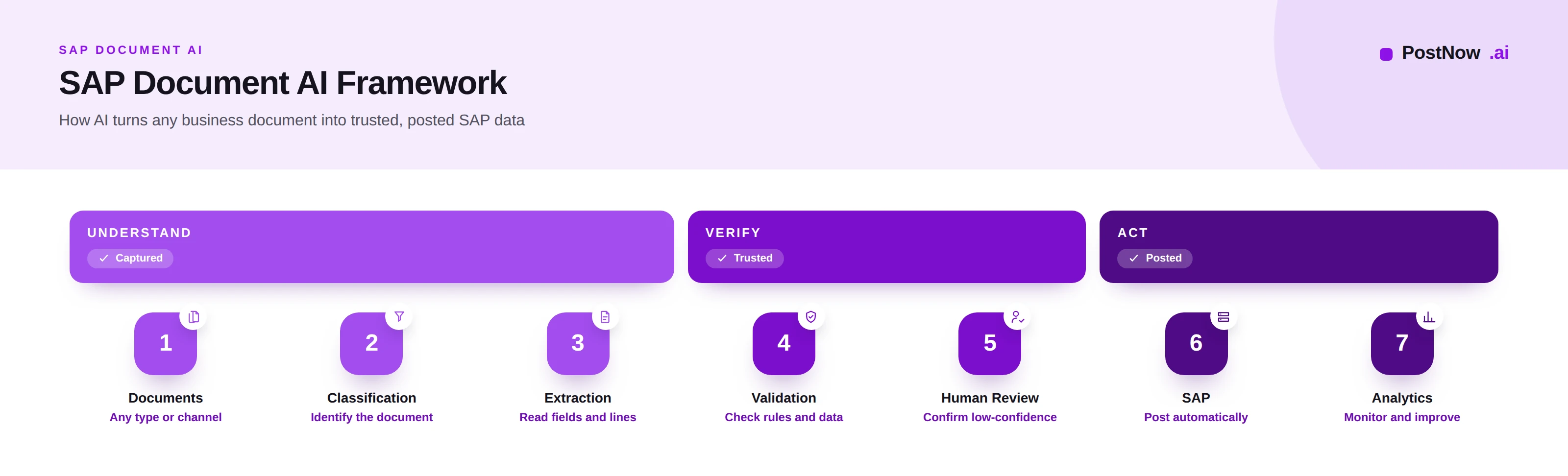
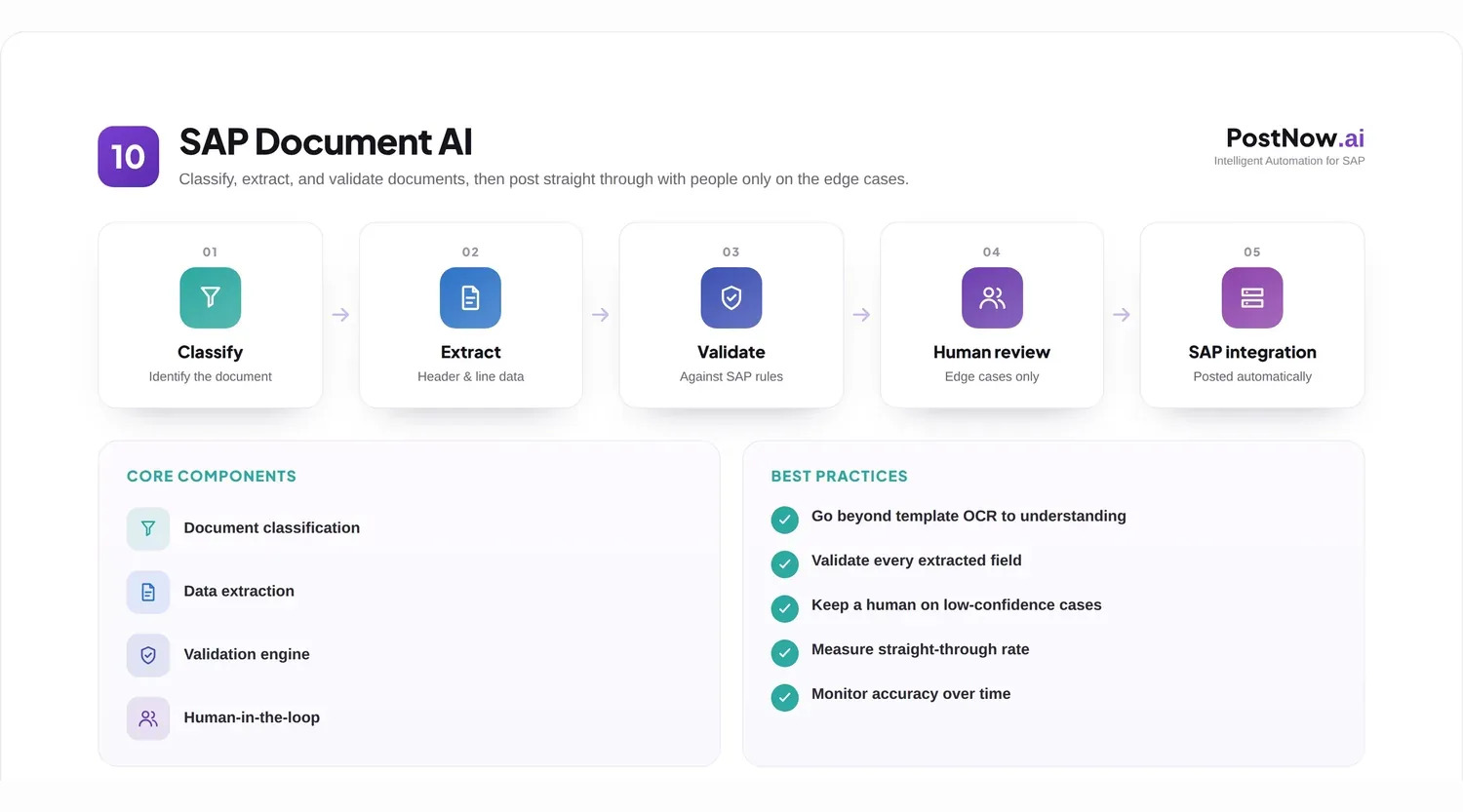
Document AI follows a clear pipeline. A document enters at one end and emerges as posted SAP data and monitoring information at the other, passing through classification, extraction, validation, review, integration, and analytics.
Document. The pipeline begins with an inbound document of any kind, arriving by email, upload, portal, or scan. Nothing about its format needs to be known in advance.
Classification. The system first identifies what the document is: an invoice, a purchase order, an onboarding form, a contract. Classification routes the document to the right extraction model and the right downstream process, and it is the step that lets one pipeline serve many document types at once.
Extraction. The relevant data is read from the document, both header-level fields and detailed line items, mapped to the meaning each carries rather than to a fixed position. Extraction is where an image becomes structured, usable data.
Validation. The extracted data is checked against rules and against SAP itself: are required fields present, does the vendor exist, are the figures internally consistent. Validation also reads the confidence the AI reports for each field, deciding what can proceed and what cannot.
Human review. Where confidence is low or a rule fails, the document is sent to a person, who confirms or corrects the data in a focused review queue. People handle the uncertain minority rather than every document, and their corrections feed back to improve the AI.
SAP integration. Once trusted, the data is posted into SAP through the appropriate interface, creating the invoice, order, or master record with the same controls a manual entry would face. Integration is where the pipeline delivers its result.
Analytics and monitoring. Finally, the pipeline reports on itself: how many documents processed, how many straight through, where exceptions cluster, and how accuracy is trending. Monitoring turns the process into something that can be measured and improved rather than merely run.
The pipeline is linear, but its intelligence is concentrated in classification and extraction, while its safety comes from validation and review. Together they let an organization automate confidently without assuming the AI is ever infallible.
It is worth noting how little of this pipeline the user sees in the routine case. A clean, recognized document is classified, extracted, validated, and posted without anyone touching it, and only the analytics reveal it happened at all. Visibility is reserved for the exceptions, which is exactly where attention belongs.
Core components of SAP Document AI
Beneath the pipeline sit several components. Each contributes to the accuracy and safety of the whole, and weakness in any one limits the rest.
Document classification determines the document type so it can be handled correctly. Good classification is what allows a single Document AI capability to serve invoices, orders, and forms together rather than needing a separate tool for each.
Header extraction reads the document-level fields, such as the parties, dates, references, and totals. Line-item extraction reads the repeating detail, such as the products, quantities, and amounts on each line. Line items are harder to extract reliably and are essential wherever detailed matching or analysis is required.
Confidence scoring attaches a measure of certainty to every extracted value. It is the component that makes automation safe, because it lets the process trust high-confidence data and question the rest rather than treating every value as equally reliable.
Validation rules encode what good data looks like, from required fields to plausible tax and recognized vendors, and stop non-conforming data from progressing. Human review provides the judgement that no rule can, resolving the cases the system flags.
Workflow orchestration moves each document through the pipeline, applying rules and routing exceptions without anyone shepherding it. Exception handling defines what happens when something is wrong, turning a stuck document into a clear, owned task rather than a silent blockage.
Accuracy is the product of these components working together. Strong classification routes correctly, strong extraction reads accurately, confidence scoring and validation catch what is uncertain, and review and exception handling resolve it. Improve any one and the whole pipeline processes more documents with less intervention.
These components are best understood as a chain in which the weakest link sets the limit. A brilliant extraction model undermined by poor classification, or strong validation with no exception path, will not deliver. Mature programs invest across all of them rather than perfecting one.
Document types commonly processed
Because Document AI understands documents rather than templates, it processes a wide and growing range of business documents that feed SAP.
- Invoices, the highest-volume document in most finance functions, covered in depth on the SAP invoice management pillar.
- Purchase orders, read to confirm or create procurement records and to support matching.
- Sales orders, extracted from customer purchase orders to create orders quickly and accurately.
- Vendor registration forms, read during supplier onboarding to create clean vendor master records.
- Tax and W-9 style forms, capturing the identifiers and declarations onboarding and compliance require.
- Bank documents, such as account confirmations, where accuracy is critical to safe payment.
- Shipping documents, including delivery notes and packing lists that confirm and record movement of goods.
- Master data forms, the requests and sheets that create or change customers, materials, and other records.
- Contracts, from which key terms, parties, and dates are extracted for reference and downstream processing.
- Other structured business documents wherever data trapped in a file needs to reach SAP reliably.
The unifying thread is that each is a document carrying data SAP needs, and each was traditionally handled by a person or a narrow tool. Document AI brings them onto one capability.
The breadth of the list above is the point. Each document type was once a separate manual task or a separate narrow tool, and bringing them onto one understanding-based capability is what turns scattered document handling into a coherent enterprise function.
SAP Document AI use cases
Document AI is not a single application but a foundation for many. The following use cases are where enterprises most often apply it, and each can become a dedicated solution in its own right.
Invoice automation
The most established use case reads supplier invoices, extracts header and line data, validates and matches them against purchase orders and goods receipts, and posts them into SAP. Document AI removes the manual keying and reading that traditionally bottlenecked accounts payable, while invoice matching and approval keep the process controlled. The full treatment lives on the invoice management pillar and connects to wider accounts payable automation.
Supplier onboarding automation
Onboarding a supplier means collecting documents, registration forms, tax forms, and bank confirmations, and turning them into a governed vendor record. Document AI reads each form, validates the details against rules and registries, and prepares the vendor for creation, replacing a slow, error-prone manual intake. The dedicated approach is covered under supplier onboarding automation.
Sales order automation
Customers send purchase orders in their own formats, by email or portal. Document AI extracts the customer, materials, quantities, and prices, validates them against master data and pricing, and creates the sales order, accelerating order capture and reducing fulfilment errors. This is explored further under sales order automation.
Vendor master automation
Beyond onboarding, ongoing master data requests arrive as documents and emails. Document AI reads the requested data, validates and enriches it, and prepares the master record for creation or change under governance, supporting the discipline described in master data governance and master data management.
Data migration and data quality
Migrations and clean-up efforts often need data trapped in legacy documents and scanned archives. Document AI extracts that data at scale, supporting an AI-assisted approach to data migration and improving the quality of what is loaded. Used this way, it turns a pile of unstructured records into structured, validated input.
Across these use cases the engine is the same; only the document type and the destination differ. That reuse is what makes Document AI a platform rather than a point solution.
Seen together, these use cases share a single shape: a document arrives, its data is understood and checked, and a record is created in SAP. Recognizing that shared shape is what lets an organization reuse one capability across finance, procurement, sales, and master data rather than buying a tool for each.
SAP integration architecture
Document AI is only valuable if its output reaches SAP cleanly and safely. The integration architecture is what connects the intelligence to the system of record.
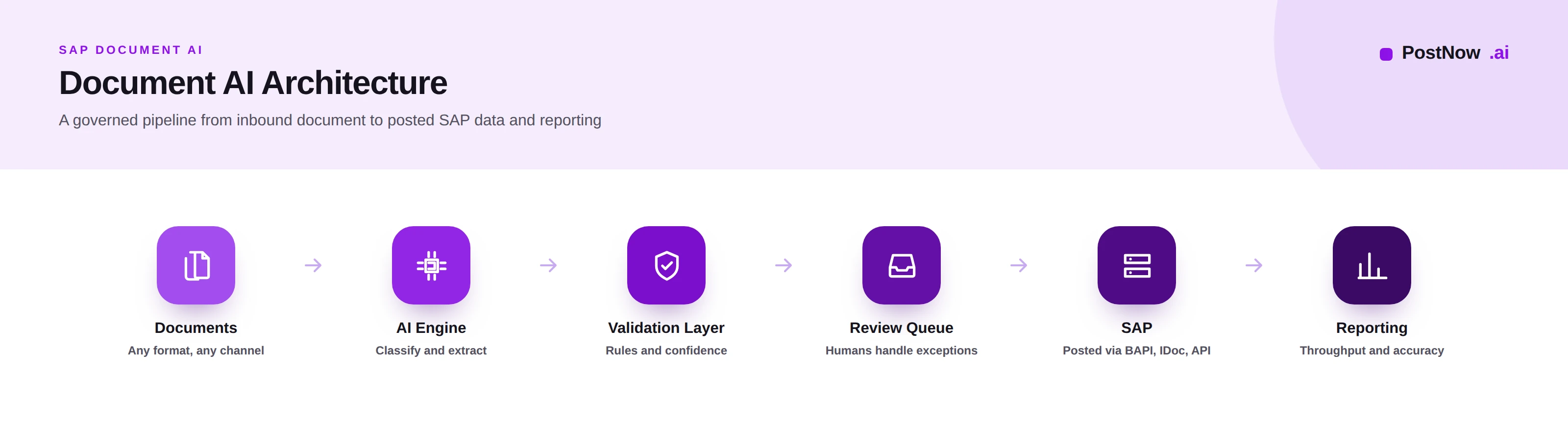
SAP ECC and SAP S/4HANA are the systems the pipeline ultimately writes to. The architecture must respect each, including the differences such as the Business Partner model in S/4HANA, so that posted data fits the target correctly.
BAPIs provide programmatic interfaces that post documents while applying SAP's own validations, suited to controlled, high-volume automated posting. IDocs offer a robust, asynchronous way to exchange documents, well established for integrations between systems. APIs expose modern services for cloud and hybrid landscapes, enabling straight-through processing from upstream tools.
SAP workflows handle the approvals and routing that posting often requires, so the pipeline triggers the right human steps inside SAP. Validation layers sit between the AI and SAP, applying business and SAP-specific checks before anything is written, so the system of record is never the place errors are first caught.
Auditability runs through the whole architecture. Every document, every AI decision, every human action, and every posting is recorded, so the process can be reviewed and defended. In a financial system, this trail is not optional; it is what makes automation acceptable.
A sound architecture treats SAP with the same care a manual process would: least-privilege access, validation before posting, and a complete record of what happened. The AI accelerates the work, but the integration is what keeps it safe. For teams whose documents originate as structured spreadsheets, a validated path such as Excel to SAP automation complements the document pipeline.
The architecture also determines how easily the capability extends. A pipeline built around reusable, governed SAP interfaces can take on a new document type by adding a classification and extraction model, not by rebuilding the integration. Designing for that reuse early pays off with every use case added later.
Human-in-the-loop processing
Enterprise Document AI is not about removing people. It is about focusing them, so human judgement is spent on the documents that need it and nothing else.
Confidence scores are the mechanism that directs human attention. Each extracted value carries a certainty, and the process uses a threshold: above it, the data flows through; below it, a person checks it. This is what lets an organization automate the routine majority while still guaranteeing a human eye on anything uncertain.
Review queues present the flagged documents to people efficiently, showing the value in question alongside the document so a reviewer can confirm or correct it in seconds. A well-designed queue turns review from a chore into a fast, focused task.
Exception handling governs documents that fail validation or matching, routing them with context to the people who can resolve them. Approval workflows add the authorizations that certain documents and amounts require, ensuring the right people sign off before anything posts.
Audit requirements are why review and approval are recorded, not just performed. Auditors and regulators expect to see who confirmed what and on what basis, and a human-in-the-loop design produces that evidence as a by-product of normal work.
Governance ties it together, defining the thresholds, the roles, the escalation, and the accountability for automated decisions. The principle is consistent with the wider view of AI in SAP automation: the AI proposes and accelerates, while accountable people decide on the consequential cases.
Enterprises retain human validation for sound reasons. AI can be confidently wrong, some documents are genuinely ambiguous, and consequential postings demand accountability that software cannot hold. The goal is therefore not zero human involvement but minimal, well-targeted involvement, with people supervising a process that handles the routine itself.
SAP Document AI best practices
The following practices separate a Document AI program that scales and earns trust from one that stalls.
- Start with high-volume, well-understood document types, such as invoices, before extending to harder ones.
- Classify before extracting, so each document is handled by the right model and process.
- Invest in extraction accuracy first, since every later step inherits its quality.
- Use confidence thresholds deliberately, tuning them to balance automation against risk.
- Validate against SAP and business rules before posting, never relying on extraction alone.
- Keep master data clean, so validation and posting are reliable, grounded in master data management.
- Design focused review queues that let people resolve exceptions in seconds.
- Feed corrections back so the AI improves from every human decision.
- Post through governed interfaces with least-privilege access and full validation.
- Keep a complete audit trail of documents, decisions, and postings.
- Match approval scrutiny to risk, reserving sign-off for consequential documents.
- Monitor straight-through rates and accuracy, and use them to target improvement.
- Plan for exceptions explicitly, treating them as a designed path rather than a failure.
- Manage change with the people affected, so the process is adopted rather than resisted.
- Keep humans accountable for automated postings, never letting the tool be the responsible party.
- Extend by reuse, applying the same pipeline to new document types rather than rebuilding.
Common challenges and how to overcome them
Document AI programs meet a predictable set of obstacles. Each has a practical mitigation.
Poor document quality. Faint scans and photographs degrade extraction. Mitigate by improving capture, favoring digital channels, and using confidence scoring to catch what the AI is unsure about.
Multiple document formats. A large counterparty base means endless layouts. Mitigate by relying on AI that understands documents natively rather than maintaining a template for each one.
Low confidence scores. Some documents will always be uncertain. Mitigate by routing low-confidence values to focused review and feeding the corrections back to improve future accuracy.
Missing information. Documents arrive incomplete. Mitigate by validating early, returning incomplete documents to their source, and encouraging structured submission that captures required fields up front.
Exception handling. Unmanaged exceptions overwhelm a team. Mitigate by designing exception paths deliberately, with context and ownership, so every flagged document becomes a clear task.
Integration complexity. Connecting AI to SAP posting can be hard. Mitigate by choosing well-supported interfaces, governing the integration, and validating that posted data reconciles with the source document.
Change management. People may distrust or resist automation. Mitigate by involving them early, framing the AI as an assistant that removes drudgery, and keeping them in control of consequential decisions.
The recurring pattern is that most Document AI challenges are really document, data, or process problems that the AI exposes. Address the underlying quality and governance, and the automation succeeds.
The PostNow Document AI maturity model
Organizations do not adopt Document AI overnight. This maturity model describes the journey in five levels and helps a team locate itself and plan its next step.
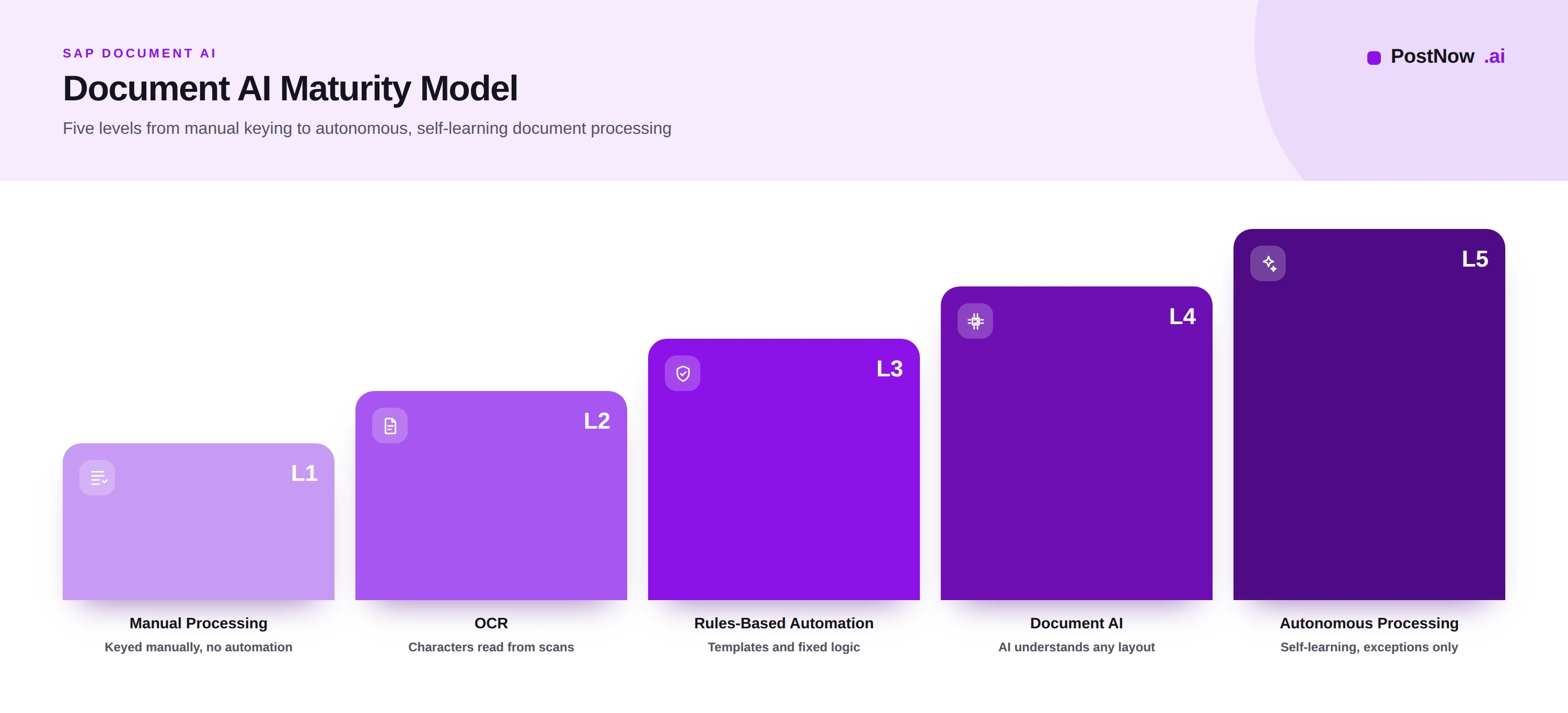
Level 1, manual processing. Documents are read and keyed by people. It is flexible but slow, costly, and inconsistent, and it does not scale with volume.
Level 2, OCR. Scanning and character recognition reduce the typing, but people still interpret and validate everything, and accuracy depends on document quality.
Level 3, rules-based automation. Templates and rules automate the predictable cases, handling known layouts well but breaking when documents change and demanding constant maintenance.
Level 4, Document AI. AI understands documents of any layout, extracts header and line data, scores its confidence, and routes only exceptions to people. Most documents flow through automatically, and the system improves from corrections.
Level 5, autonomous processing. The process largely runs itself, learning continuously, adapting to new documents, and surfacing only the rare cases that need a person. People supervise and govern rather than operate.
| Level | What it looks like | Human role |
|---|---|---|
| 1 Manual | Everything keyed by people | Performs all work |
| 2 OCR | Text captured, interpreted by people | Validates everything |
| 3 Rules-based | Known cases automated | Handles the rest |
| 4 Document AI | Most documents automated | Resolves exceptions |
| 5 Autonomous | Self-learning, near hands-off | Supervises and governs |
Most enterprises today sit between levels two and four. The value of the model is not to reach level five quickly but to identify the next realistic step and the capability, in data, governance, and technology, that will support it.
The future of SAP Document AI
Document AI is advancing quickly, but the direction is clear: greater understanding, more autonomy, and people moving steadily from operators to supervisors.
Generative AI brings deeper contextual understanding, reading documents and their nuances much as a person would and reducing the configuration any new document type requires.
Agentic AI moves beyond extraction toward action, where AI not only reads a document but carries out the multi-step process around it, gathering, checking, and preparing under defined guardrails.
Autonomous document processing is the destination this implies: pipelines that handle the routine majority end to end, escalating only the rare exception, with people supervising rather than running them.
Enterprise AI platforms are consolidating these capabilities, so document understanding becomes a shared service across many processes rather than a separate tool for each.
Continuous validation shifts checking from a single gate to an ongoing assurance across the whole document population, while self-learning systems improve from every correction without explicit reprogramming.
None of this removes the need for governance. As autonomy grows, the human role concentrates on setting policy, defining guardrails, and standing behind the controls, which is precisely where experienced SAP and finance professionals remain essential.
Frequently asked questions
What is SAP Document AI?
What is the difference between OCR and Document AI?
What is intelligent document processing in SAP?
How does AI extract data from documents into SAP?
What document types can SAP Document AI process?
How accurate is AI document extraction?
What is human-in-the-loop document processing?
How does Document AI integrate with SAP S/4HANA?
What is confidence scoring in document AI?
Is SAP Document AI the same as SAP invoice automation?
What is document classification?
How does Document AI handle exceptions?
What is autonomous document processing?
Conclusion and next steps
SAP Document AI is the foundation beneath a generation of document automation, turning the unstructured documents that feed SAP into trusted, posted data with people supervising rather than keying.
Its defining shift is from matching templates to understanding documents, which is what lets a single capability serve invoices, orders, onboarding forms, master data, and more. Its safety comes not from assuming the AI is perfect but from confidence scoring, validation, human review, and a complete audit trail. And its value is realized only when the pipeline integrates cleanly and is governed well.
For an organization beginning this journey, the practical next steps are to pick a high-volume document type, prove the pipeline on it with strong validation and focused human review, integrate it cleanly into SAP, and then extend the same capability to the next document type. Each addition reuses the foundation, which is what turns Document AI from a project into an enduring enterprise capability.