Executive summary
SAP invoice matching is the control that reconciles a supplier invoice against the documents that justify it, the purchase order and the goods receipt, so the organization pays only for what it agreed to buy and actually received.
Matching is where most of the value and most of the friction in accounts payable concentrate. When an invoice agrees with its order and receipt, payment is safe and can proceed automatically. When it does not, the difference must be investigated, and that investigation is where AP teams spend a disproportionate share of their effort. Getting matching right, and automating it, is therefore central to a controlled, efficient pay process.
This page is a practical guide to invoice matching in SAP. It explains the matching types, how the process runs, the role of tolerance rules, how exceptions are handled, and how the whole control is automated. It sits within accounts payable automation and the wider invoice management lifecycle.
What is SAP invoice matching?
SAP invoice matching, also called invoice verification, is the comparison of an invoice against its supporting documents to confirm the amount billed is correct and authorized before the invoice is posted and paid.
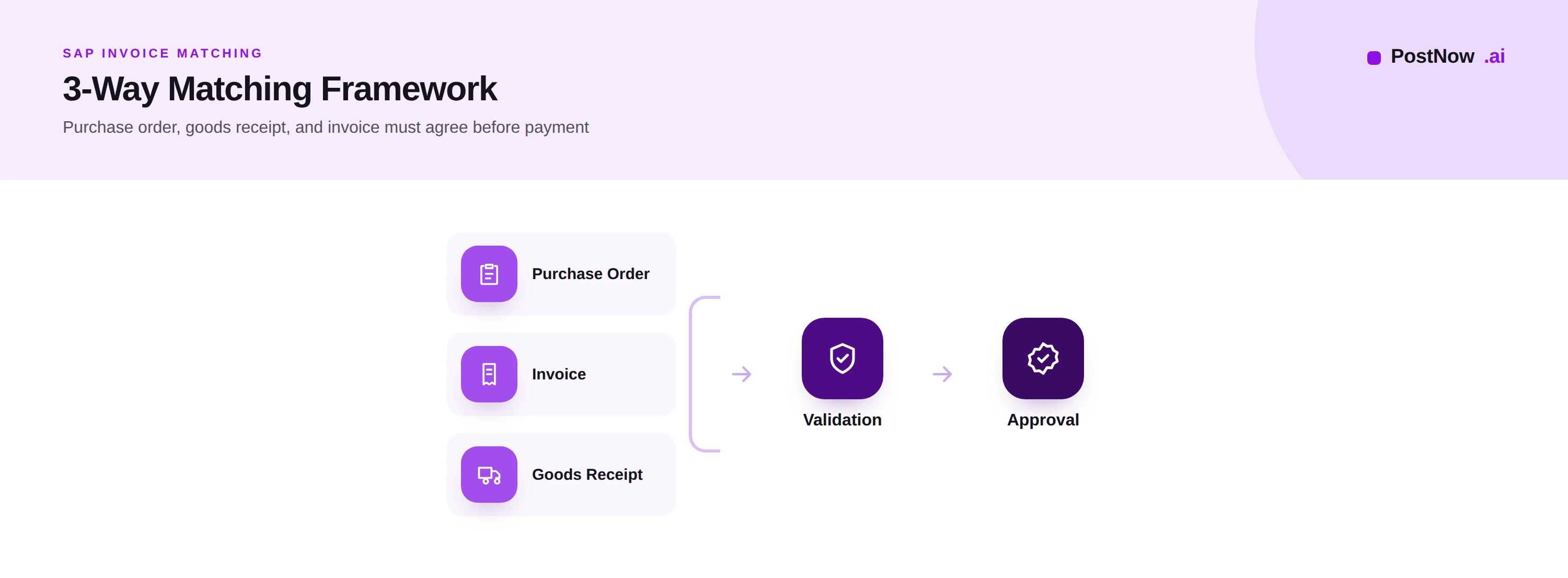
The principle is simple accountability. A purchase order records what the organization agreed to buy and at what price. A goods receipt records what was actually delivered. An invoice claims payment. Matching confirms that these three tell the same story before money changes hands, so the business never pays for goods it did not order or did not receive.
The terms are used interchangeably in practice. SAP invoice matching and SAP invoice verification describe the same control, the verification step that precedes posting for purchase-order invoices. SAP three-way matching names the most rigorous form of that control, which brings the goods receipt into the comparison. In SAP, this verification is performed within logistics invoice verification, where the invoice meets the order and receipt.
Matching is not bureaucracy; it is the financial gate that protects the organization from overpaying, paying twice, or paying for what never arrived.
Why invoice matching matters
Matching is the single most effective control in accounts payable, and automating it delivers both protection and efficiency.
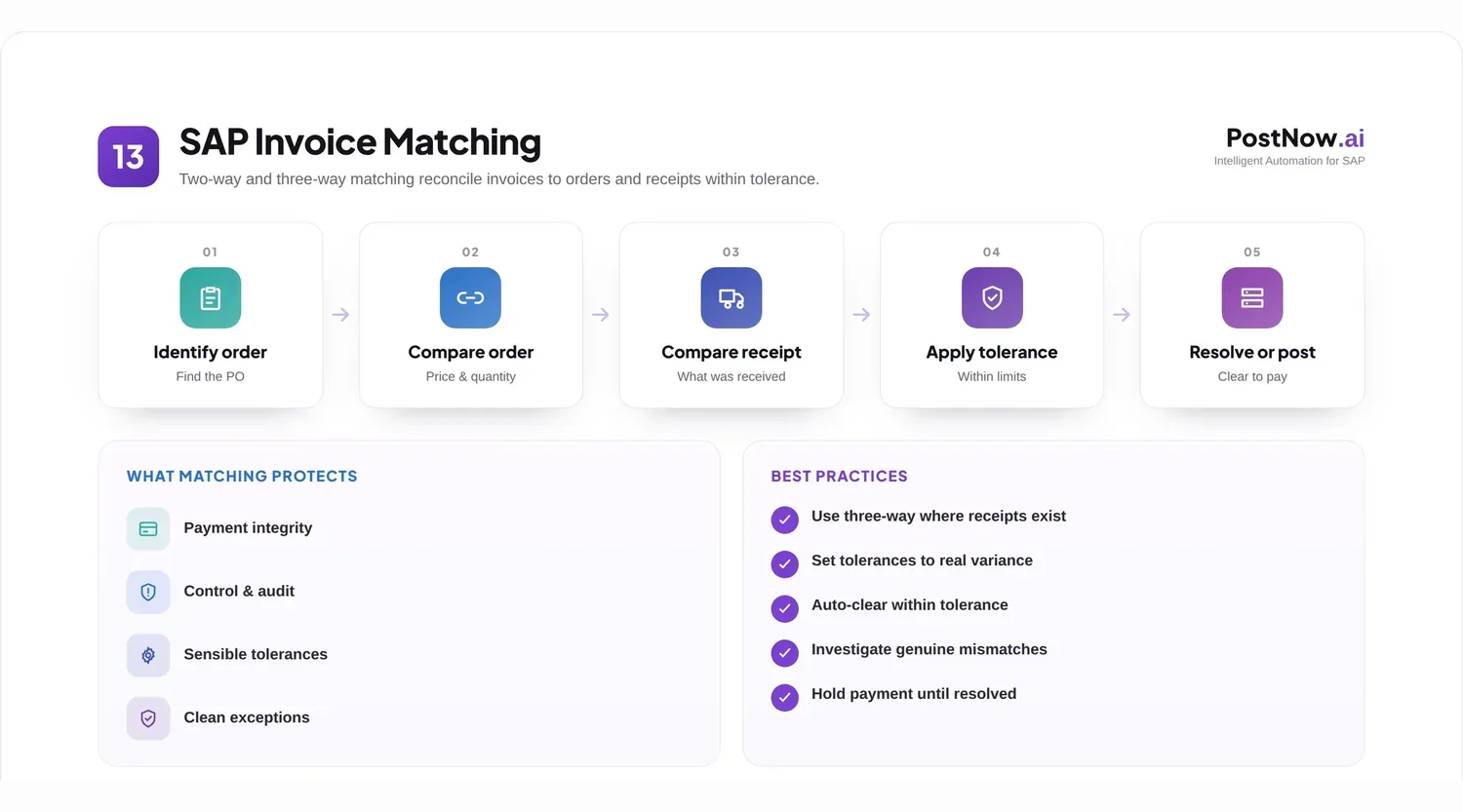
Payment integrity. Matching ensures the organization pays the agreed price for goods genuinely received. It is the primary defense against overbilling, unauthorized charges, and paying for undelivered goods.
Efficiency. When matching is automated and most invoices agree within tolerance, those invoices proceed without human effort, freeing the team for the exceptions that need judgement.
Control and audit. A documented match provides the evidence that each payment was justified, which auditors and controllers require. The match record shows precisely why an invoice was paid.
Supplier relationships. Consistent, prompt matching means correct invoices are paid on time and genuine differences are raised clearly, which suppliers prefer to silence followed by short payment.
Cash protection. By catching errors before payment, matching prevents the leakage that overpayments and duplicates represent, protecting cash that is far harder to recover once it has left.
Matching types: two-way and three-way
Matching comes in two principal forms, distinguished by how many documents must agree.
Two-way matching compares the invoice against the purchase order alone. It confirms that the quantities and prices billed match what was agreed when the order was placed. It suits situations where a separate record of delivery is unnecessary or impractical, such as many services, where there is no physical goods receipt to record.
Three-way matching adds the goods receipt, comparing the invoice against both the order and the confirmation that goods were received. It is the stronger control because it verifies not only that the price was agreed but that the goods genuinely arrived, closing the gap that two-way matching leaves for goods ordered and billed but never delivered.
The choice between them is a balance of control and practicality. Three-way matching is the standard for physical goods, where the goods receipt exists and the risk of paying for undelivered items is real. Two-way matching is appropriate where no meaningful receipt is captured. A mature AP function applies each where it fits rather than forcing one everywhere.
| Aspect | Two-way | Three-way |
|---|---|---|
| Documents compared | Invoice, order | Invoice, order, receipt |
| Confirms delivery | No | Yes |
| Control strength | Moderate | Strong |
| Best for | Services, no receipt | Physical goods |
How the matching process works
Matching follows a clear sequence once an invoice has been read and its purchase order reference identified.
Identify the order. The invoice is linked to its purchase order through the reference it carries. Without a clean order reference, automated matching cannot begin and the invoice falls to manual handling, which is why accurate references matter so much.
Compare to the order. The invoiced items, quantities, and prices are checked against the order. Each line is reconciled so that what is billed corresponds to what was agreed.
Compare to the receipt. In three-way matching, the invoiced quantities are also checked against the goods receipt, confirming that the items billed were actually delivered, not merely ordered.
Apply tolerances. Small, acceptable differences are allowed to pass, so the process is not blocked by trivial variances. Differences beyond tolerance are flagged.
Resolve or proceed. An invoice that matches within tolerance proceeds to approval and posting. One that does not becomes an exception, blocked until the difference is investigated and resolved.
Consider an order for one hundred units at an agreed price, against which ninety units are received and an invoice arrives for one hundred. Two-way matching against the order alone would find the price and quantity as ordered and let the invoice pass. Three-way matching catches that only ninety were received, holding the invoice for the ten units that were billed but never delivered. That distinction is the whole reason three-way matching exists.
Tolerance rules
Perfect agreement is rare, and insisting on it would block the process needlessly. Tolerance rules define how much difference is acceptable.
Why tolerances exist. Rounding, minor price changes, partial deliveries, and small quantity differences are normal. Treating every one as an exception would bury an AP team in trivial investigations and delay payment for no benefit.
Price tolerance permits the invoiced price to differ from the order price by a defined amount or percentage. A difference within the limit passes; one beyond it is held for review.
Quantity tolerance permits the invoiced quantity to differ from what was received or ordered within a defined range, accommodating partial deliveries and rounding.
Setting tolerances well is a judgement. Too tight, and the team drowns in immaterial exceptions; too loose, and real errors slip through. The right level lets routine variances flow while ensuring material differences are always caught, and it is reviewed as experience reveals where errors actually occur.
Tolerances are what make automated matching practical. They encode the organization's definition of a difference worth a human's attention, so people see only the variances that matter.
Exception handling
Exceptions are invoices that fail to match within tolerance. Handling them well is where matching either controls cost or creates it.
Common exceptions include a price higher than the order, a quantity billed exceeding what was received, a missing goods receipt, a missing or incorrect order reference, and charges not on the order at all. Each represents a question that must be answered before payment.
Routing and context. An exception is routed to the person who can resolve it, with the relevant documents and the specific difference highlighted, so the investigation starts with the facts rather than a search. Good routing turns a blocked invoice into a clear task.
Resolution paths vary by cause: a price difference may need a buyer to confirm a renegotiated price, a quantity difference may await a delayed goods receipt, and an unauthorized charge may be disputed with the supplier. The process defines who owns each path.
Reducing exceptions at the source matters more than processing them faster. Recurring mismatches usually point to an upstream cause, an outdated price on an order, a receipting delay, a supplier billing incorrectly, and fixing that cause removes the exception permanently rather than handling it again next month.
The measure of a healthy matching process is a low and falling exception rate, achieved not by loosening control but by removing the reasons exceptions arise.
Automating invoice matching
Automated matching applies the comparison and tolerance logic to every invoice instantly, so the matching majority proceeds untouched and only exceptions reach people.
When an invoice is read, automation links it to its order, compares lines to the order and receipt, applies tolerances, and decides: proceed or except. For the large share of invoices that agree, this happens in moments and without human involvement, which is the foundation of touchless processing.
Automation also improves the handling of exceptions. By detecting and categorizing each difference, it routes the exception with its cause identified, so resolution is faster and patterns become visible. Over time, the data it produces shows where exceptions cluster, directing the upstream fixes that reduce them.
Matching automation depends on the quality of what feeds it: accurate invoice extraction, clean order references, timely goods receipts, and well-set tolerances. Where these are strong, a high proportion of invoices match automatically; where they are weak, exceptions proliferate regardless of the tool. The capability draws on document reading from Document AI and the recognition techniques in invoice OCR, and the deeper mechanics are explored in invoice management.
Best practices
These practices distinguish matching that controls and accelerates from matching that merely blocks.
- Apply three-way matching for physical goods, where confirming delivery is the key protection.
- Use two-way matching where no meaningful receipt exists, such as many services.
- Insist on clean order references so invoices can be matched automatically.
- Capture goods receipts promptly, since a missing receipt blocks three-way matching.
- Set tolerances deliberately, tight enough to catch real errors, loose enough to ignore trivia.
- Review tolerances periodically as experience reveals where differences actually occur.
- Route exceptions with full context so investigation starts from the facts.
- Assign clear ownership for each exception type and resolution path.
- Track the exception rate as the headline measure of matching health.
- Fix recurring exceptions at the source rather than reprocessing them.
- Keep the vendor and material master clean, grounded in master data management.
- Record every match as audit evidence for the payment.
- Automate the matching majority, reserving people for genuine differences.
- Detect duplicates alongside matching to prevent paying the same invoice twice.
- Report exception causes, using the data to target the next improvement.
Common challenges
Matching programs meet a recognizable set of obstacles, each with a practical response.
Missing or late goods receipts. Three-way matching cannot complete without a receipt. Mitigate by tightening receipting discipline so deliveries are recorded promptly.
Poor order references. Invoices without a clean order reference cannot match automatically. Mitigate by improving how references are captured and by reading them reliably from the invoice.
High exception volume. Too many mismatches overwhelm the team. Mitigate by analyzing causes and fixing them upstream rather than processing each exception repeatedly.
Tolerance miscalibration. Tolerances set wrongly either block trivia or let errors through. Mitigate by reviewing them against actual difference patterns and adjusting.
Master data gaps. Inaccurate vendor or material data undermines matching. Mitigate by cleansing and governing the master so matching has reliable references.
The PostNow matching maturity framework
Matching maturity is measured by how much matches automatically and how few exceptions arise. This framework describes five levels.
Level 1, manual. A person compares each invoice to its documents by sight; matching is slow and inconsistent.
Level 2, system-assisted. SAP performs the comparison, but exceptions are numerous and handled with little structure.
Level 3, tolerance-driven. Well-set tolerances let routine differences pass, and exceptions are routed with ownership.
Level 4, intelligent. Extraction and references are accurate, most invoices match automatically, and exceptions are categorized by cause.
Level 5, optimized. The exception rate is low and falling because causes are fixed at the source, and the matching majority is genuinely touchless.
| Level | Auto-match rate | Exception handling |
|---|---|---|
| 1 Manual | None | By sight |
| 2 Assisted | Low | Unstructured |
| 3 Tolerance-driven | Moderate | Routed with ownership |
| 4 Intelligent | High | Categorized by cause |
| 5 Optimized | Very high | Causes fixed at source |
Most organizations sit between levels two and four. The framework helps locate the current level and choose whether to invest next in references, tolerances, or upstream causes.
The future of invoice matching
Matching is becoming more intelligent and more preventive, catching and resolving differences with less human effort.
AI resolves more exceptions automatically by recognizing their cause and proposing the resolution, while intelligent workflows adapt routing to the difference and its history. Continuous monitoring watches the whole invoice population for emerging mismatch patterns, so causes are addressed before they generate a wave of exceptions.
Preventive matching is the direction this implies: rather than catching differences after the invoice arrives, the process increasingly surfaces the upstream issues, a stale price, a receipting gap, before they become exceptions at all. As elsewhere, accountability stays human; the system accelerates and explains, while people own the decisions on genuine differences.
Frequently asked questions
What is SAP invoice matching?
What is the difference between 2-way and 3-way matching?
What is three-way matching in SAP?
What are tolerance limits in invoice matching?
What happens when an invoice does not match?
How is invoice matching automated in SAP?
Why are goods receipts important for matching?
How do you reduce invoice matching exceptions?
Conclusion and next steps
SAP invoice matching is the control at the heart of safe payment, confirming that an invoice agrees with what was ordered and received before money moves.
The essentials are consistent: choose two-way or three-way matching to fit the spend, link each invoice to its order, compare against order and receipt, apply sensible tolerances, and handle exceptions with context and ownership. The greatest gains come not from processing exceptions faster but from removing their causes, and from automating the matching majority so people see only genuine differences.
A practical first step is to ensure clean order references and prompt goods receipts, then automate matching with well-calibrated tolerances. To go further, see accounts payable automation, invoice management, and Document AI.