Executive summary
Accounts payable automation in SAP is the practice of running the entire pay side of procure-to-pay with software rather than people, so that supplier invoices are captured, checked, matched, approved, posted, and paid with minimal manual touch.
For finance leaders, accounts payable is a paradox: it is high in volume, low in glamour, and yet directly responsible for cash, supplier trust, and a great deal of audit exposure. Run manually, it absorbs headcount and still produces late payments, missed discounts, and the occasional duplicate. Automated well, it becomes fast, controlled, and measurable.
This page explains how to automate accounts payable in an SAP environment end to end. It covers what AP automation is, why it matters to the business, how the flow works, the building blocks that make it reliable, the use cases it serves, the compliance and audit requirements it must satisfy, and a maturity framework for measuring progress toward touchless processing.
The wider mechanics of the invoice itself are covered on the SAP invoice management pillar; this page focuses on automating the accounts payable function that surrounds it.
What is accounts payable automation in SAP?
Accounts payable automation is the replacement of manual AP tasks with an automated flow that handles vendor invoices from arrival through to settlement inside SAP.
Where a manual AP team reads, keys, chases, and files invoices, an automated function captures each invoice digitally, reads its data, runs its checks, routes it for the approvals policy requires, posts it to SAP, and schedules payment, escalating to a person only when something needs judgement.
It is worth distinguishing the terms that surround this. AP automation in SAP describes automating the accounts payable function within an SAP landscape specifically, respecting SAP's transactions, controls, and master data. Vendor invoice automation is the part that handles the supplier invoice within that function. The two are closely related: vendor invoice automation is the engine, and AP automation is the whole vehicle, including approvals, payment, compliance, and reporting.
In SAP terms, the function spans logistics invoice verification for purchase-order invoices, financial accounting for those without an order, the workflows that route approvals, and the payment program that settles what has been posted. Automation connects these into one continuous flow rather than a series of manual handoffs.
Why accounts payable automation matters
AP automation pays back across several dimensions at once, which is why it is among the most common early targets for finance transformation.
Efficiency. Manual AP scales linearly: more invoices demand more people. Automation breaks that link, letting volume grow without proportional headcount, and redirecting skilled staff from keying toward analysis, supplier management, and control.
Cash and working capital. Faster processing means invoices can be paid within early-payment discount terms rather than late, and payment timing can be managed deliberately rather than dictated by a backlog. Both improve the organization's command of its own cash.
Data quality. Automated capture and validation reduce the keying errors that later become reconciliation problems, so the figures the business reports on are more trustworthy from the start.
Governance and compliance. Automation enforces approval policy and segregation of duties consistently, rather than relying on individuals to remember them, which strengthens internal control and reduces the risk of improper payment.
Auditability. Because every step is recorded, the function can show auditors who approved what, on what basis, and when, turning audit from a scramble into a query.
Scalability. A single automated approach extends across entities, currencies, and geographies, so a process proven in one part of the organization can serve the whole, which manual processes rarely achieve cleanly.
How accounts payable automation works
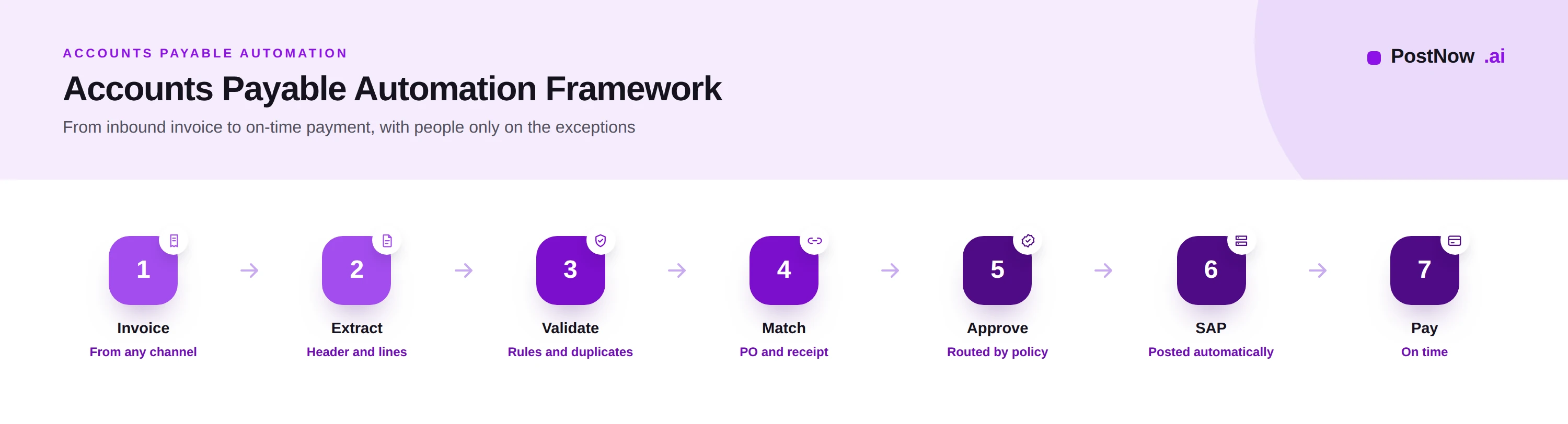
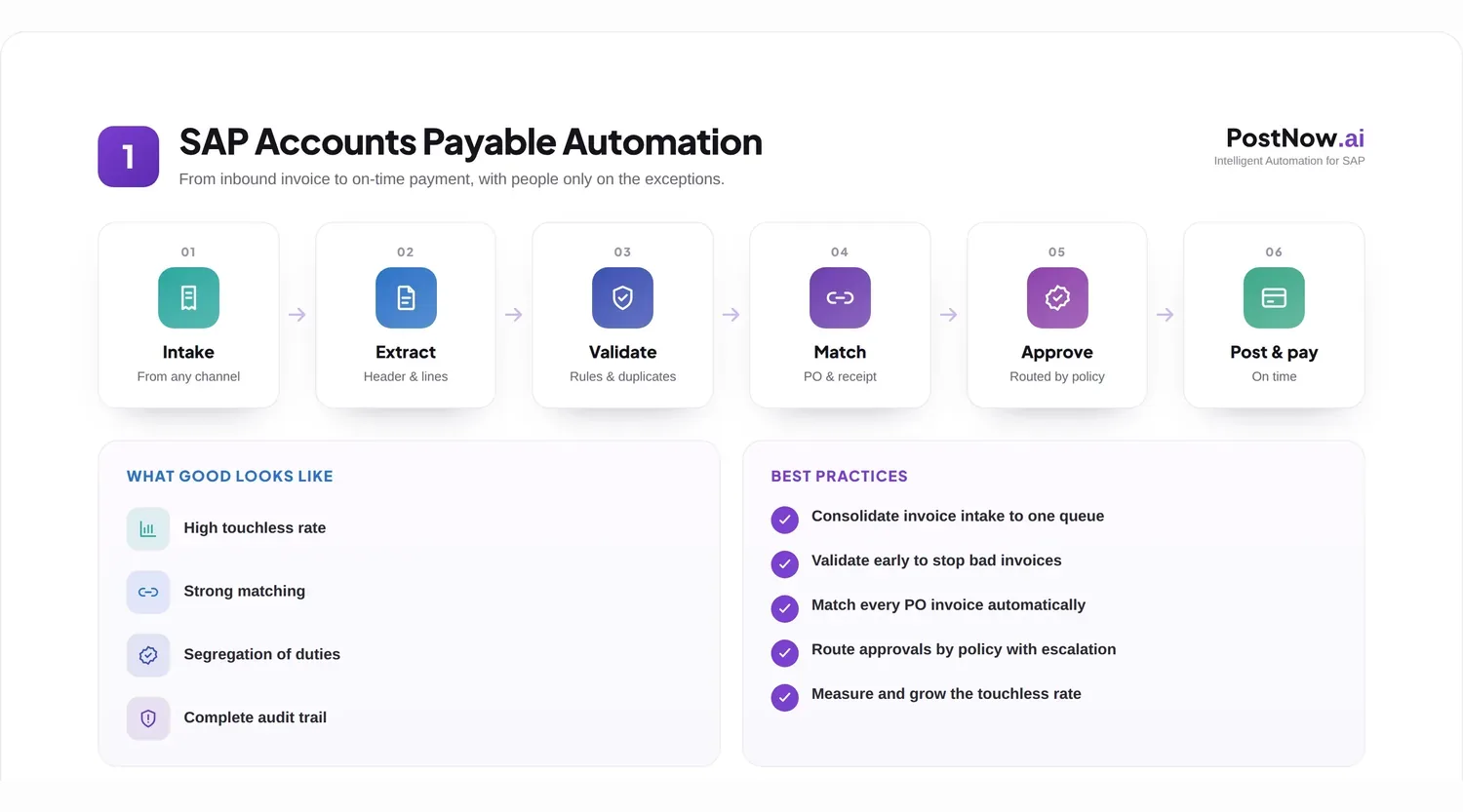
The automated function moves each invoice through a defined sequence. The flow is continuous, with software handling the routine path and people handling exceptions.
Intake. Invoices arrive through email, supplier portals, electronic feeds, or scanning, and are gathered into a single managed queue. Consolidating intake is the first step, because invoices scattered across personal inboxes cannot be automated.
Extraction. Each invoice is read, its supplier, references, amounts, tax, and line detail converted into structured data. The accuracy here governs how much of the rest can run untouched.
Validation. The data is checked for completeness, a recognized and active supplier, plausible tax, valid currency, and the absence of a duplicate. Failures are held before they can travel further.
Matching. Purchase-order invoices are reconciled against the order and the goods receipt, confirming the organization is billed only for what it agreed and received. This is the function's central control, covered in depth under SAP invoice matching.
Approval. Invoices are routed to the right approvers by amount, cost object, and policy, with escalation when someone is unavailable, so authorization happens promptly and is never lost in an inbox.
Posting. Approved invoices are recorded in SAP, creating the accounting document and the payable, through the appropriate transaction or interface.
Payment. Posted invoices are settled according to their terms by the payment program, on time and capturing discounts where available.
A clean, matched, in-policy invoice can travel this entire path without a person, which is the definition of touchless processing and the goal the function works toward.
Core building blocks
Beneath the flow sit the building blocks that make automation dependable. Each strengthens the touchless rate and the control around it.
Capture and extraction turn inbound documents into data, drawing on the document-understanding capability described on the SAP Document AI pillar and the recognition techniques covered under invoice OCR.
A validation rule set encodes what a valid invoice looks like for the organization, from required references to tax plausibility and duplicate detection, and applies it to every invoice automatically.
A matching engine reconciles invoices to purchase orders and goods receipts within tolerance, deciding what can post and what must be held as an exception.
A workflow engine routes approvals and exceptions, applies escalation and delegation, and keeps every invoice moving toward resolution.
Posting integration writes verified invoices into SAP through governed interfaces, applying the same controls a manual posting would face.
Analytics and monitoring report the touchless rate, the exception rate, cycle time, and discount capture, turning the function into something that can be measured and improved rather than merely operated.
The blocks reinforce one another: better extraction reduces validation failures, better validation reduces matching exceptions, and better matching reduces the approvals that need human judgement. Improving any one lifts the whole.
Common use cases
AP automation applies across the range of invoices a typical enterprise receives, each with its own handling.
Purchase-order invoices are the most automatable, because the order and goods receipt provide the references against which the invoice can be matched and posted with little human involvement.
Non-purchase-order invoices, such as utilities, rent, and professional services, lack an order to match against, so automation focuses on coding them correctly and routing them to the right approver for confirmation.
Recurring invoices for predictable, periodic charges can be handled with standing rules, so they post automatically each cycle while remaining visible and controlled.
Exception-heavy suppliers, whose invoices frequently mismatch, are a use case in themselves: automation surfaces the pattern, so the underlying ordering or master data problem can be fixed rather than worked around forever.
Multi-entity and global AP uses one automated approach across company codes, currencies, and tax regimes, giving a shared service center a single, consistent way to process invoices from many parts of the business.
Consider a shared service center processing invoices for a dozen entities. Before automation, each entity's quirks meant local workarounds; after automation, one governed flow handles them all, with local rules expressed as configuration rather than as separate manual processes.
Compliance and auditability
Because accounts payable releases money, it sits squarely within internal control and audit scope. Automation must strengthen that control, not bypass it.
Segregation of duties ensures that the same person cannot create a vendor, approve an invoice, and release its payment. Automation enforces this consistently through roles and workflow, removing the gaps that manual processes leave.
Approval policy is applied uniformly, so every invoice receives exactly the authorization its amount and category require, with no exceptions slipping through because someone was in a hurry.
Tax and regulatory compliance is supported by validating tax treatment and handling country-specific requirements, including the electronic invoicing mandates that an increasing number of jurisdictions impose.
The audit trail records every action: what arrived, how it was read, what was checked, who approved it, and how it posted and paid. This evidence is produced automatically, so an audit becomes a matter of retrieval rather than reconstruction.
Well-designed automation makes the controlled path the easy path. Doing the right thing, matching, approving, recording, becomes automatic, and circumventing control becomes the harder, visible exception.
Best practices
These practices, drawn from mature AP operations, distinguish automation that scales from automation that stalls.
- Consolidate intake into one managed channel so no invoice is processed from a personal inbox.
- Encourage purchase-order coverage, since PO invoices automate far more readily than non-PO ones.
- Keep the vendor master clean, grounded in master data management, so validation and payment are reliable.
- Set sensible matching tolerances so trivial differences pass and only material ones are reviewed.
- Detect duplicates rigorously across multiple fields to prevent paying the same invoice twice.
- Automate approval routing and escalation so authorization never waits silently.
- Enforce segregation of duties through roles and workflow rather than trust.
- Post through governed interfaces with validation before anything reaches SAP.
- Measure the touchless rate and treat raising it as the program's headline objective.
- Track and reduce exceptions at the source, fixing the ordering or data cause rather than reprocessing.
- Capture early-payment discounts by processing fast enough to pay within terms.
- Keep a complete audit trail so compliance is demonstrable on demand.
- Manage exceptions with context, giving investigators what they need to resolve quickly.
- Keep people accountable for automated postings, consistent with AI in SAP automation.
- Review metrics regularly and target the next improvement deliberately.
Common challenges
AP automation programs meet a familiar set of obstacles. Each has a practical mitigation.
Low purchase-order coverage. When much spend arrives without an order, matching cannot help. Mitigate by working with procurement to raise PO coverage and by streamlining the handling of genuine non-PO spend.
Poor vendor master data. Duplicate or incorrect vendor records undermine validation and payment. Mitigate by cleansing the master and governing changes to it.
High exception volume. A flood of mismatches overwhelms the team and erodes the benefit. Mitigate by analyzing exception causes and fixing them upstream rather than reprocessing endlessly.
Approval bottlenecks. Invoices stall waiting for approvers. Mitigate with automated routing, escalation, and delegation so approval keeps moving.
Integration and change. Connecting tools to SAP and shifting people to a new way of working both take care. Mitigate by governing the integration and by involving the AP team early, framing automation as relief from drudgery rather than a threat.
The PostNow touchless AP maturity framework
Progress in AP automation is best measured by how little human touch each invoice requires. This maturity framework describes that journey in five levels.
Level 1, manual. Invoices are keyed and checked manually; the touchless rate is effectively zero.
Level 2, assisted. Capture and extraction reduce the typing, but validation, matching, and approval remain largely manual.
Level 3, rules-based. Defined rules automate the predictable invoices, while exceptions and non-standard cases still require people.
Level 4, intelligent. AI and document understanding handle varied invoices, confidence scoring routes only uncertain ones to people, and the touchless rate rises substantially.
Level 5, touchless. The routine majority of invoices flow from receipt to payment without human involvement, and the AP team supervises exceptions, suppliers, and control rather than processing.
| Level | Touchless rate | Human focus |
|---|---|---|
| 1 Manual | Near zero | All processing |
| 2 Assisted | Low | Checking and matching |
| 3 Rules-based | Moderate | Exceptions |
| 4 Intelligent | High | Uncertain cases |
| 5 Touchless | Very high | Supervision and control |
Most organizations sit between levels two and four. The framework's value is to name the next realistic step and the capability, in data, rules, and AI, needed to reach it.
The future of AP automation
Accounts payable is moving toward genuine autonomy, with people supervising rather than operating the function.
AI continues to raise the share of invoices handled without intervention, learning from every correction. Intelligent workflows adapt routing and handling to the invoice and its history rather than following fixed rules. Continuous control monitoring watches the whole invoice population for anomalies and emerging risk rather than checking one invoice at a time.
Autonomous accounts payable is the destination: a function where the routine majority runs itself, and people focus on judgement, supplier relationships, and governance. As autonomy grows, accountability does not move; setting policy and standing behind the controls remains a human responsibility, which is where experienced finance professionals add the most value.
Frequently asked questions
What is accounts payable automation in SAP?
What is the difference between AP automation and invoice automation?
What is a touchless invoice?
How does AP automation improve compliance?
Can AP automation handle non-PO invoices?
How is the touchless rate improved?
How does AP automation integrate with SAP?
What metrics measure AP automation success?
Conclusion and next steps
Accounts payable automation turns one of finance's most labor-intensive functions into a fast, controlled, and measurable one, paying back in efficiency, cash command, and compliance at the same time.
The path is well understood: consolidate intake, extract accurately, validate and match rigorously, route approvals without delay, post and pay through governed interfaces, and measure the touchless rate as the headline of progress. The destination is a largely autonomous function with people supervising exceptions and control.
A practical first step is to automate purchase-order invoices, where matching gives the strongest control and the highest touchless rate, then extend to non-PO and recurring spend. To go deeper on the surrounding topics, see the invoice management pillar, invoice matching, and Document AI.