Introduction
Automation succeeds or fails long before any tool is configured. It is decided by whether the process, the data, and the people around it were ready in the first place.
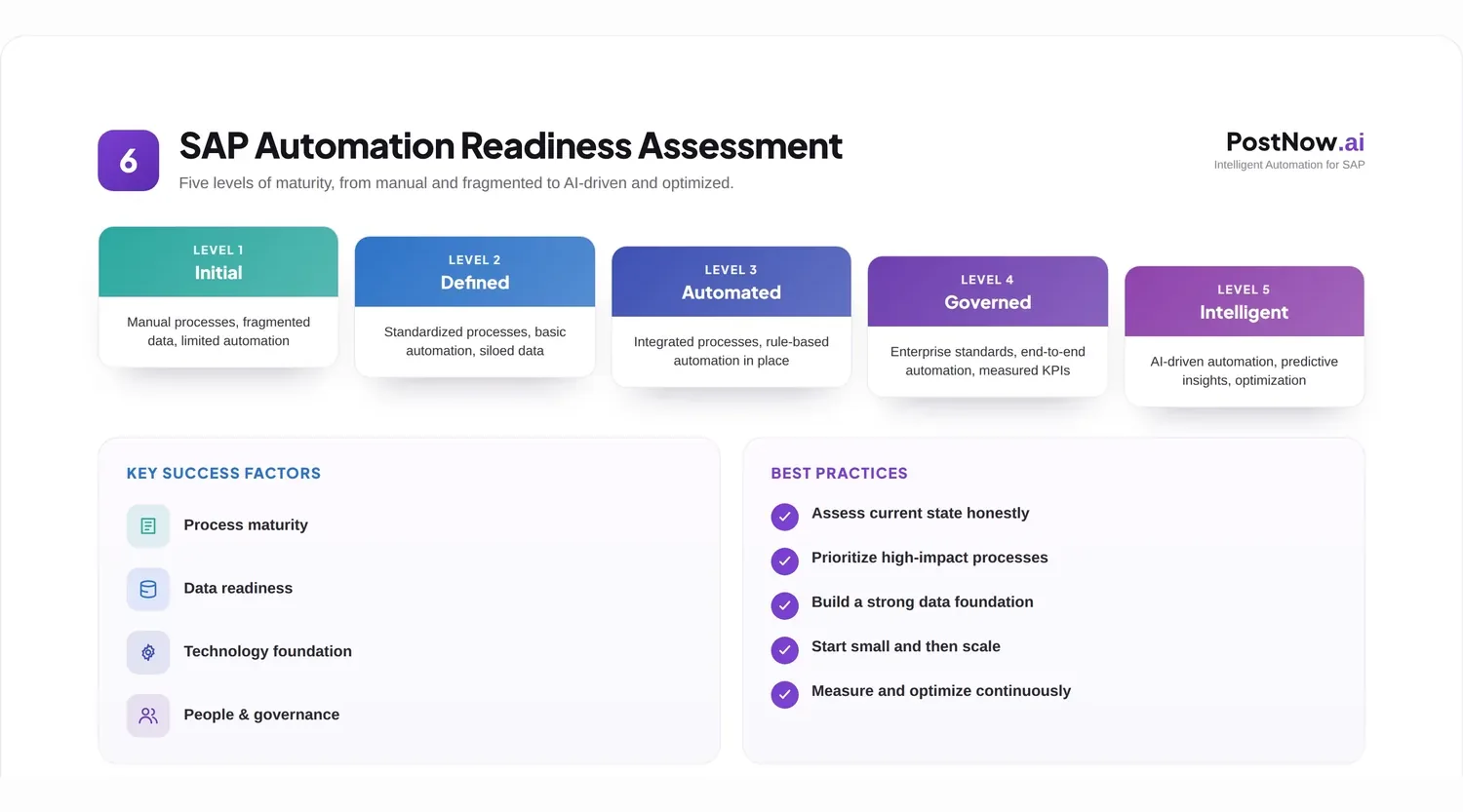
Teams usually reach this question when a manual SAP task has become a burden and automation looks like the obvious cure. The instinct is to jump straight to tooling, but the more useful first move is an honest readiness check, which often reveals that a little preparation will make the automation far more likely to stick.
This guide sets out a practical readiness checklist: the dimensions to assess, a scorecard to apply, and a way to tell a strong automation candidate from one that needs work first. It complements the SAP process automation pillar, which covers the doing once you are ready.
It is written for the people who decide what to automate, and who would rather pick winners than rescue stalled projects.
A readiness check need not be heavy. For a single process it can be a short conversation against a list; for a broader program it becomes a more formal assessment. Either way, the value is the same: it replaces optimism with evidence before money and time are committed.
It is also worth distinguishing readiness from enthusiasm. A process can be the one everyone most wants automated and still be the least ready, because its very painfulness often comes from instability or poor data. The checklist keeps that enthusiasm honest.
The sections that follow take each idea in turn, beginning with why the question deserves attention at all before moving to how to answer it.
Why this matters
Skipping the readiness question is one of the quietest ways an automation effort goes wrong, because the cost shows up later and indirectly.
The business impact is real. Automating an unstable process simply makes the instability faster, and automating on poor data spreads errors at machine speed rather than catching them. Readiness is what keeps automation from amplifying existing problems.
There are governance and operational angles too. An automated task still needs clear ownership, defined roles, and an audit trail, and if those are missing before automation, they will be missing after it. Assessing readiness forces these questions into the open while they are still easy to answer.
Common SAP challenges make the check more important, not less. Processes that span ECC and S/4HANA, master data that is inconsistent, and roles that have grown tangled over years all affect whether automation will behave. A readiness review surfaces these realities before they surface as incidents.
It also helps to think of readiness as protecting the automation, not gatekeeping it. The goal is never to say no for its own sake, but to make sure that when you do say yes, the result will work and last. Seen that way, the checklist is an ally of automation rather than an obstacle to it.
Throughout, the assessment is about the process and its surroundings, not about any particular product. Tool selection comes later and is easier once readiness is clear, because a ready process tends to make its own requirements obvious.
The structure of this guide mirrors the assessment itself: first why readiness matters, then the dimensions to weigh, then a scorecard to apply them, and finally the challenges, practices, and mistakes that surround the exercise. Read straight through for a method, or jump to the scorecard for a tool you can use today.
One more framing before the detail: readiness is cheaper to build than to skip. Every hour spent confirming a process is ready saves many more spent fixing an automation that should never have launched, which is why even busy teams find the assessment worth the pause.
Core concepts: the dimensions of readiness
Readiness is not a single yes or no. It is a set of dimensions, each of which can be strong, weak, or somewhere between.
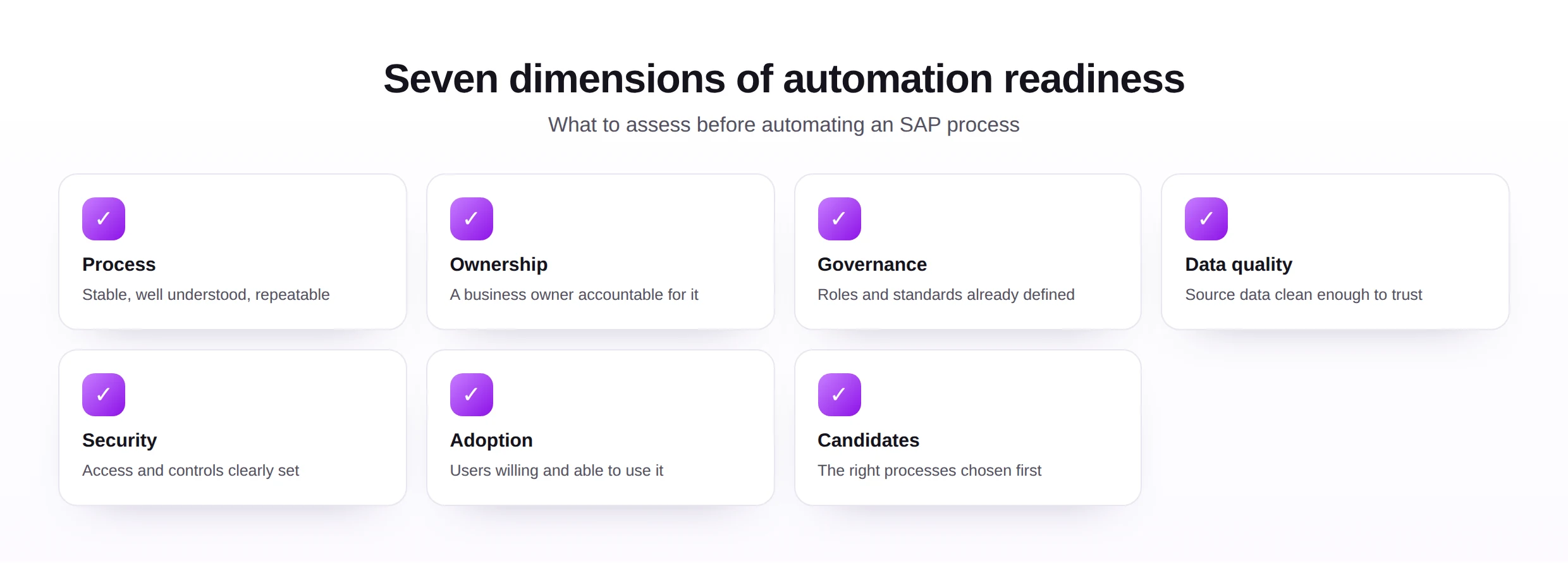
Grouping the seven dimensions into three clusters, the process, the foundations, and the people, makes them easier to reason about. A candidate can be strong in one cluster and weak in another, and knowing which is which tells you exactly where to focus before you proceed.
The first cluster is about the process itself. A good candidate is stable, well understood, and repeatable, with a named business owner accountable for it. Processes that change constantly or that nobody clearly owns are poor places to start.
The second cluster is about the foundations. Governance, in the sense of defined roles and standards, and data quality, in the sense of source data clean enough to trust, determine whether automation will produce reliable results. Both lean on solid master data management.
The third cluster is human and protective. Security and access must be clear, and users must be willing and able to adopt the change. The best-built automation fails if the people it serves quietly route around it.
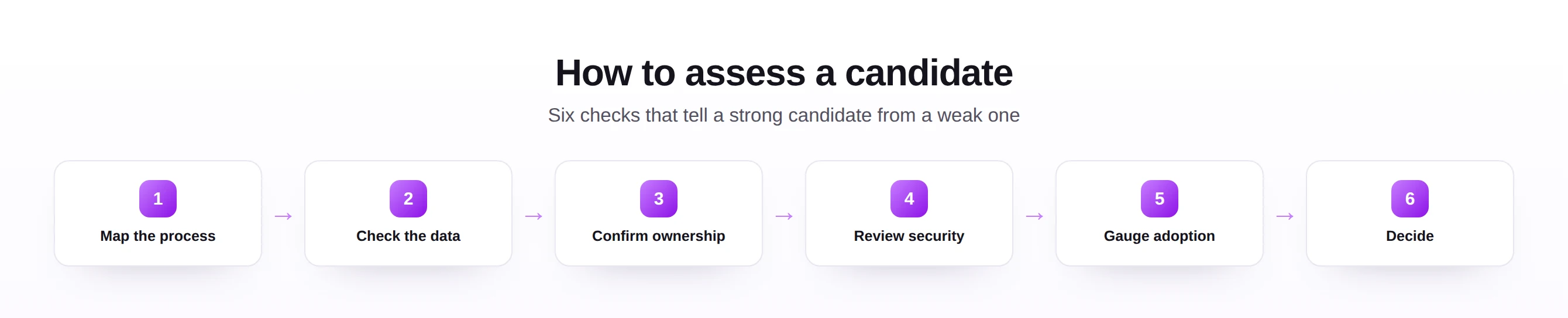
Walking these dimensions in order, as the steps above suggest, turns a vague sense of readiness into a structured judgment you can defend and revisit.
One reassurance about the dimensions: weakness in any single one is rarely fatal, only informative. It points to a specific, usually modest piece of preparation, such as documenting a process or cleansing a data set, after which the same candidate may score perfectly well. Readiness is a state you can reach, not a verdict you are stuck with.
It is worth noting that readiness is not permanent. A process judged unready today can become a strong candidate after a short burst of preparation, so the assessment is best repeated as circumstances change rather than treated as a one-time verdict.
The readiness scorecard
A scorecard turns the dimensions into a quick, honest assessment. Rate each one, and the weak spots become your preparation list.
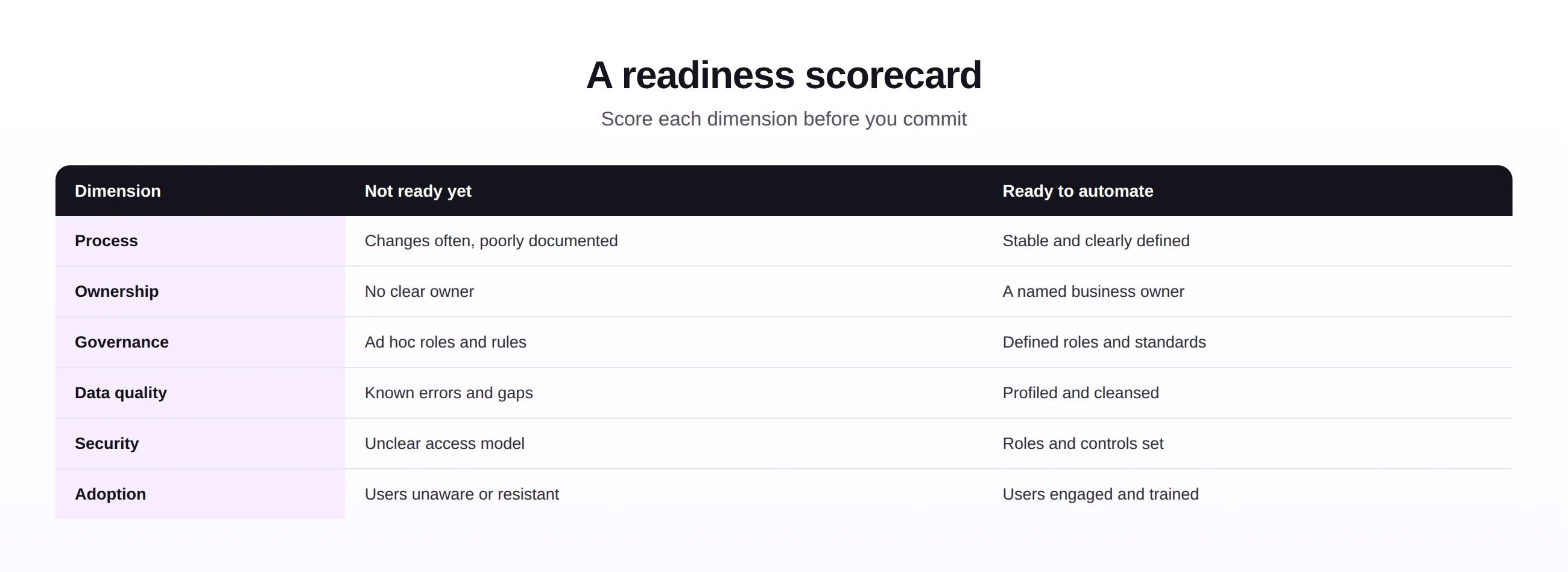
| Readiness check | You are ready when... |
|---|---|
| Process | It is stable, documented, and repeatable. |
| Ownership | A business owner is accountable for it. |
| Governance | Roles and standards are defined and in force. |
| Data quality | Source data has been profiled and cleansed. |
| Security | Access and controls are clearly set. |
| Adoption | Users are engaged, trained, and supportive. |
Used regularly, the scorecard also builds a shared language across a team. When everyone rates candidates against the same dimensions, conversations about what to automate become concrete and comparable, rather than a contest of opinions about which task feels most annoying.
Keep the scoring honest by gathering evidence rather than impressions. Asking to see the process documentation, the data profile, or the role assignments turns a comfortable assumption into a fact, and it is usually the gathering of that evidence that exposes the gaps worth fixing.
The scorecard is most useful when it is allowed to say no. A process that scores poorly is not a failure; it is a signal to fix the weak dimension first, which is far cheaper than automating around it and discovering the gap in production.
A practical refinement is to weight the dimensions for your context. An organization with strong governance but patchy data might treat data quality as the decisive factor, while one with clean data but loose ownership might weight ownership most. The scorecard is a starting frame, not a fixed formula.
Common challenges
A few recurring obstacles make readiness harder to reach, and each has a practical root cause.
- Undocumented processes, where the real steps live only in someone's head, so the process must be mapped before it can be judged.
- Hidden data problems, invisible until you profile the source, which is why profiling comes early.
- Unclear ownership, where responsibility is shared so widely that no one truly holds it.
- Tangled security, with access grown over years, needing review before automation inherits it.
- Adoption doubts, where users were never consulted and so resist the change later.
The common root cause is that these things were never made explicit. Readiness assessment is largely the act of writing down what was assumed, and most of the difficulty dissolves once the assumptions are visible.
It is worth treating the assessment itself as valuable output, regardless of the automation decision. The documentation, data profile, and ownership clarity it produces improve the process even if you never automate it, which means the effort is rarely wasted.
None of these challenges is unusual, and that is reassuring. They are the normal state of processes that grew organically over years, and meeting them is simply the work of bringing order to something that has run on habit. Expect them, and they lose most of their power to derail a project.
Best practices
A few habits make readiness assessment reliable and turn it into lasting capability rather than a one-off exercise.
- Assess governance before tooling, so roles and standards are ready to inherit, grounded in master data governance.
- Profile data early, so quality is a known quantity, not a surprise.
- Build in auditability, so the automated process can be reviewed from day one.
- Design for scale and maintenance, so the automation survives growth and staff changes.
- Confirm security explicitly, so access and controls are intentional, not inherited by accident.
These practices favor governance, auditability, scalability, security, and maintainability in equal measure. An automation chosen and prepared this way tends to keep working long after the excitement of launch has faded, which is the real test.
Underlying these practices is a shift in sequence: do the foundational work first and the automation second, rather than hoping to retrofit governance and quality afterward. Retrofitting is always harder, because the automation is by then carrying live work that the missing foundations were supposed to protect.
Common mistakes
Most readiness mistakes come from wanting to skip straight to the automation.
Each has the same fix: assess the weak dimension and address it before automating, not after. The readiness checklist exists precisely to make these omissions visible while they are still cheap to correct.
The thread through every mistake is impatience. Each one trades a small delay now for a larger problem later, and the readiness checklist is simply a way of making that trade visible before it is made. A short pause to assess is almost always cheaper than the cleanup it prevents.
Future trends
Assessment is becoming more data-driven, while the questions it asks stay constant.
- AI-assisted discovery, helping map how a process actually runs today.
- Automated data profiling, measuring quality readiness faster and more thoroughly.
- Continuous readiness, tracked as a live measure rather than a one-time gate.
- Governance by design, with roles and audit built into automation from the start.
- Guided candidate selection, suggesting which processes are worth automating first, supported by modern automation tools.
However the assessment is tooled, the underlying judgment will not change. A process worth automating is still one that is stable, owned, governed, clean, secure, and welcomed, and a checklist that confirms those will always earn its place.
For teams beginning to automate, the most useful starting move is to run a handful of candidate processes through this checklist and compare the scores. The exercise usually reveals an obvious first project, one that is ready today, whose success then builds the confidence and the pattern for the harder ones.
The encouraging conclusion is that readiness is almost entirely within your control. Unlike many project risks, the dimensions here respond directly to effort: document the process, cleanse the data, clarify ownership, and the score improves. That makes the checklist not just a filter but a roadmap to becoming ready.